
Promass 10 Quick Access Overview
Promass 10 is a Coriolis mass flowmeter widely used in industrial processes, supporting the Quick Access function for on-site commissioning and parameter viewing. Through Quick Access, engineers can efficiently complete device configuration and diagnostics.
This article explains the operation steps, function highlights, and selection references of Promass 10 Quick Access, suitable for engineering technicians and procurement personnel.
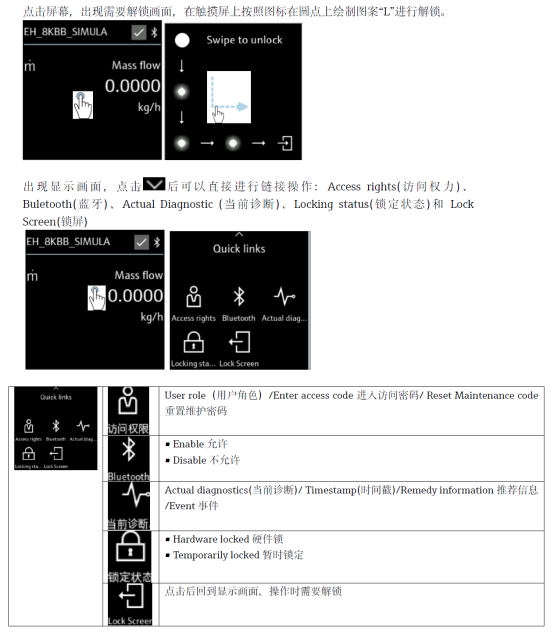
[Click the image to enlarge]
Promass 10 Quick Access Operation Steps
The Quick Access function can be entered through the local display or a commissioning tool. The following is the general operation procedure.
- Confirm that the instrument is powered on and in normal measurement or standby status.
- Enter the Quick Access menu through the display panel or commissioning software.
- Select the parameter group to view or modify, such as measured values, units, range, etc.
- Follow the prompts to confirm and save the parameters, which take effect after exiting.
During operation, pay attention to permission settings to avoid accidentally changing key parameters and affecting measurement accuracy.
Quick Access Core Functions and Parameters
Common Access Items
- Real-time measured values: mass flow, volume flow, density, temperature.
- Unit switching: supports quick switching between metric and imperial units.
- Range and alarms: view and adjust the range and alarm thresholds.
- Diagnostic information: read device status and fault codes.
Parameter Comparison Reference
| Parameter Item | Description | Typical Range |
|---|---|---|
| Mass flow | Direct mass flow measurement | Depends on model |
| Density | Medium density measurement | 0~3000 kg/m³ |
| Temperature | Process temperature monitoring | -50~+200 ℃ |
| Communication protocol | Supports HART, Modbus, etc. | Optional configuration |
Selection and Usage Recommendations
When purchasing and configuring Promass 10, an appropriate model should be selected based on medium characteristics, flow range, and communication requirements. The Quick Access function can significantly shorten commissioning time. It is recommended to verify parameters immediately after installation.
- Confirm that the process connection matches the pipe size.
- Select wetted materials according to medium corrosiveness.
- Check the compatibility of output signals with the control system.
For more detailed Quick Access codes and menu structure, please refer to the official operating manual or contact technical support.