
Overview of Promass 10 Current Output Range Setting
Promass 10 is a Coriolis mass flowmeter launched by Endress+Hauser and is widely used in industrial process measurement. The setting of its current output range directly affects the accuracy of signal transmission and system compatibility. This article introduces step by step how to correctly configure the 4-20mA current output range.
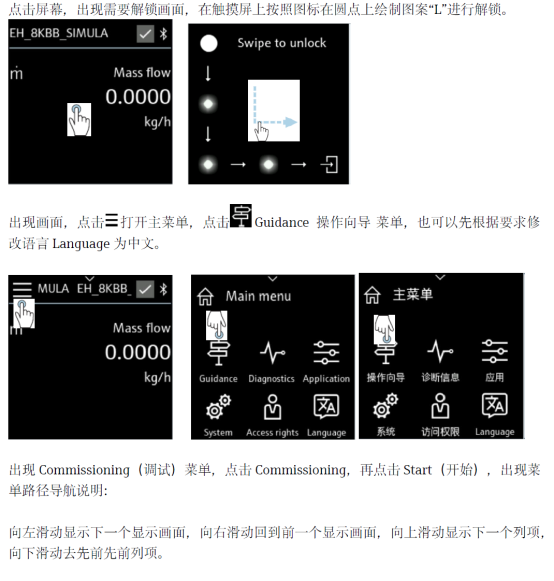
[Click the image to enlarge]
Preparation Before Setting
Before starting the setting, please ensure the following conditions are met to avoid operating errors or equipment damage.
- Confirm that the flowmeter has been installed correctly and is powered on.
- Prepare a HART handheld communicator or commissioning software (such as FieldCare).
- Obtain the current range parameters and process requirements.
- Ensure that the operator has the corresponding qualifications.
Current Output Range Setting Steps
Follow the steps below to complete the current output range configuration of the Promass 10.
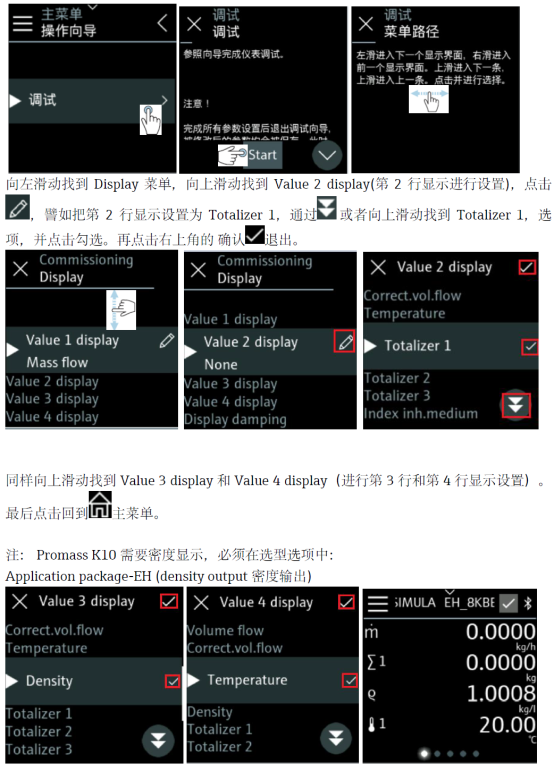
- Enter the device menu and select the "Output" or "Current Output" option.
- Find the "Range" setting item and select "4-20mA" or a custom range.
- Enter the corresponding lower limit value (4mA) and upper limit value (20mA), usually corresponding to the minimum and maximum flow.
- Confirm the settings and save the parameters.
- Verify whether the signal is accurate through simulated output or actual flow.
[Click the image to enlarge]
Parameter Descriptions and Precautions
Correctly understanding the meaning of parameters helps avoid setting errors. The following are descriptions of key parameters:
| Parameter | Description | Typical Value |
|---|---|---|
| Value corresponding to 4mA | Lower limit of current output, usually corresponding to zero flow or minimum flow | 0 kg/h |
| Value corresponding to 20mA | Upper limit of current output, corresponding to maximum flow | According to sensor specifications |
| Alarm current | Output current in case of fault, can be set to 22mA or 3.6mA | 22 mA |
Note: The range setting must match the host computer system, otherwise signal errors may occur. After modifying parameters, it is recommended to perform a loop test.
Common Problems and Solutions
The following problems may be encountered during the setting process:
- The output current does not change: Check whether the wiring is correct and confirm that the range is not set to a fixed value.
- Large current value deviation: Recalibrate the current output, or check whether the power supply voltage is stable.
- Unable to save parameters: Confirm whether the device is in write protection status and needs a password to unlock.
If the problem persists, please refer to the Promass 10 manual or contact technical support.