
Overview of Promass 10 Customer-Specific Password Setting
Promass 10 is a high-precision flowmeter introduced by Endress+Hauser, widely used in industrial process measurement. To prevent unauthorized parameter modification, the device supports setting a customer-specific password. This article will guide you step by step to complete the password setting and ensure safe operation of the device.
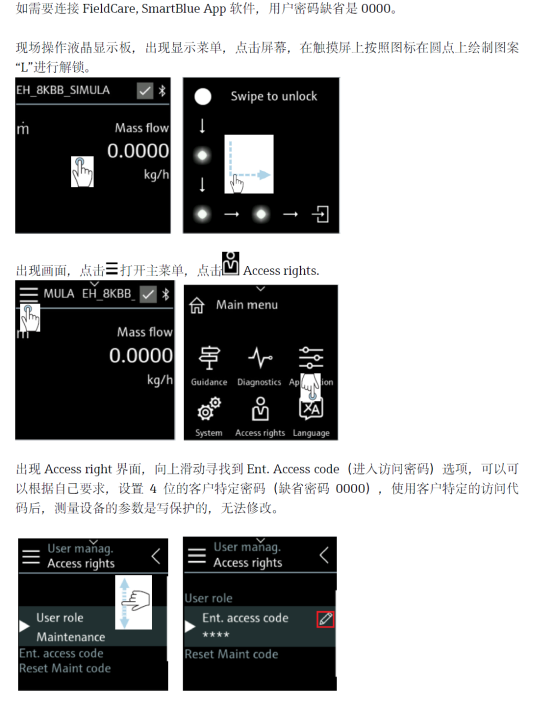
[Click the image to enlarge]
Steps to Set the Customer-Specific Password
Please follow the steps below to ensure the password is set correctly.
- Enter the device main menu and select the "Setup" option.
- In the setup menu, find the "Password" or "Security" submenu.
- Select the "Customer-specific password" option.
- Enter the new password you want to set (usually a 4-digit number).
- Confirm the password and save the settings.
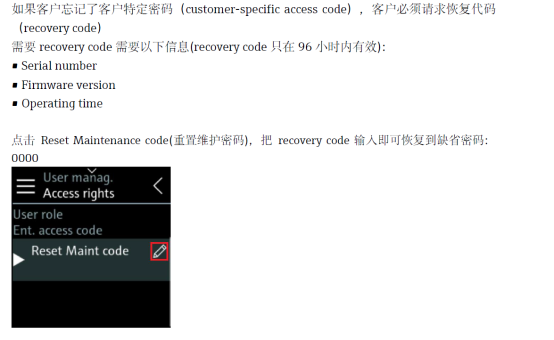
[Click the image to enlarge]
Precautions and Parameter Description
When setting the password, please note the following:
- The password length and complexity must meet the device requirements.
- Please keep the password safe. If lost, you need to contact the manufacturer for reset.
- The customer-specific password is different from the factory password, which is used for advanced maintenance.
| Parameter | Description |
|---|---|
| Password type | Customer-specific password |
| Default password | None (must be set by yourself) |
| Password length | 4-digit number |
| Scope of application | Parameter modification protection |
FAQ
What should I do if I forget the password?
If you forget the customer-specific password, you need to contact Endress+Hauser technical support and provide the device serial number for reset.
Can the password be canceled after setting?
Yes. Enter the password menu and select "Disable password" to cancel password protection.