
Detailed Explanation of Promass 10 Display Mode Modification and Multivariable Display
Promass 10 is a Coriolis mass flowmeter launched by Endress+Hauser, supporting measurement and display of multiple process variables. By modifying the display mode, users can view multiple variables simultaneously, improving on-site monitoring efficiency.
[Click image to enlarge]
Why is multivariable display needed?
In industrial processes, a single variable is often insufficient to fully reflect operating conditions. Promass 10 can measure parameters such as mass flow, volume flow, density, and temperature. Multivariable display allows operators to quickly grasp the overall status.
- Improve monitoring efficiency and reduce screen switching time
- Facilitate fault diagnosis and process optimization
- Meet complex recipe and batch control requirements
Operation steps to modify display mode
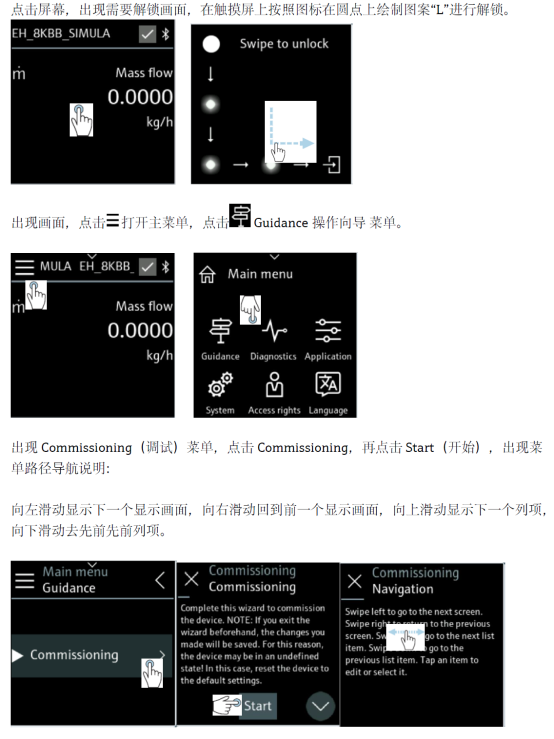
Through the local display interface or configuration software, the display variables can be easily modified. The following are typical steps:
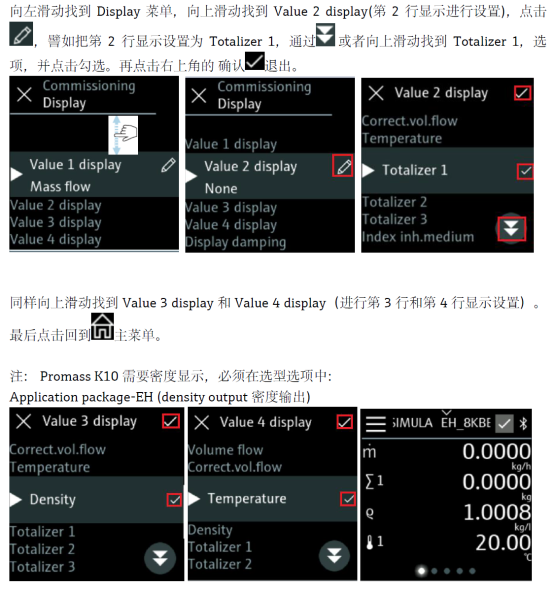
- Enter the main menu and select the "Display" option.
- Find the "Display variables" setting item.
- Select the variables to display, such as mass flow, volume flow, density, temperature, etc.
- Confirm and save the settings, then return to the measurement interface to see the multivariable display.
[Click image to enlarge]
Description of multivariable display parameters
The following table lists common display variables supported by Promass 10 and their units for configuration reference.
| Variable name | Unit | Description |
|---|---|---|
| Mass flow | kg/h, t/h | Direct mass flow measurement with high accuracy |
| Volume flow | m³/h, L/h | Calculated based on density |
| Density | kg/m³, g/cm³ | Real-time medium density |
| Temperature | °C, °F | Medium temperature measurement |
Precautions
- Ensure that the transmitter firmware supports the multivariable display function.
- Too many display variables may affect the refresh rate; it is recommended to select according to actual needs.
- After modification, the settings must be saved and will remain effective after power-off and restart.
Through the above settings, Promass 10 can flexibly display multiple variables to meet the monitoring needs of different industrial scenarios. For more detailed guidance, please refer to the official manual or contact technical support.