
Overview of the Promass 10 Rotating Display
The Promass 10 rotating display is a human-machine interface designed specifically for industrial flowmeters, featuring a rotatable structure that facilitates data reading by operators in complex installation environments. This display is typically used in conjunction with Promass series mass flowmeters and is suitable for industries such as chemical, petroleum, and pharmaceutical. Its core advantages lie in flexible angle adjustment and a high protection rating, meeting the demanding on-site working conditions.
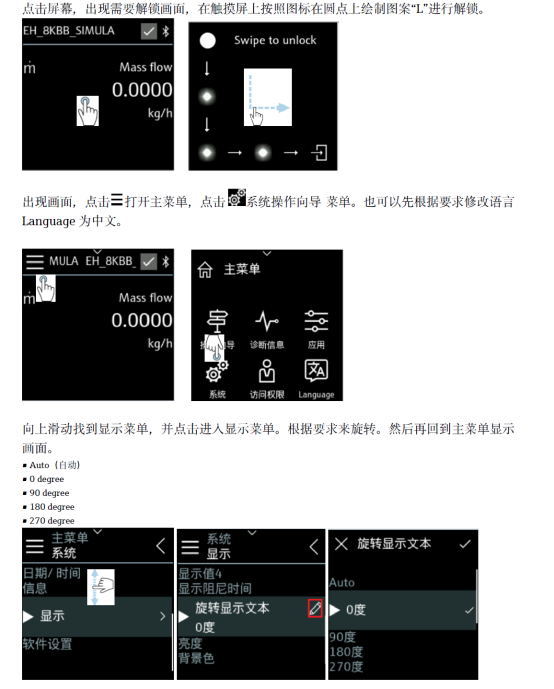
[[Click the image to enlarge]
Main Technical Features
Rotating Structure and Display Performance
- Multi-angle rotation: The display can rotate horizontally or vertically, with a maximum adjustment range typically of 180°, adapting to different installation positions.
- High-contrast display: Uses LCD or OLED technology, clearly readable in both strong light and dark environments.
- Protection rating: Typically IP67, dustproof and waterproof, suitable for outdoor and washdown areas.
- Operating interface: Supports button or touch operation, with simple menu logic for easy parameter setting and fault diagnosis.
Compatibility and Communication
- Seamlessly integrates with Promass 10 series transmitters, supporting communication protocols such as HART and Modbus.
- Can display process variables such as instantaneous flow, cumulative flow, temperature, and density.
- Features backlight adjustment and auto screen-off functions to extend service life.
Installation and Commissioning Steps
- Power-off preparation: Turn off the flowmeter power to ensure safe operation.
- Fix the display: Align the rotating base with the transmitter interface and turn clockwise until locked.
- Adjust the angle: Loosen the rotation locking ring, turn the display to a direction convenient for observation, then tighten.
- Electrical connection: Connect the power and signal lines according to the wiring diagram, paying attention to shielding layer grounding.
- Power-on test: After power-on, check whether the display is normal and enter the menu to calibrate parameters.
Comparison of Key Parameters
| Parameter | Specification | Description |
|---|---|---|
| Display type | LCD/OLED | High contrast, wide temperature operation |
| Rotation angle | 180° | Adjustable horizontally/vertically |
| Protection rating | IP67 | Dustproof and waterproof |
| Operating temperature | -40°C ~ +85°C | Industrial-grade wide temperature |
| Communication protocol | HART, Modbus | Optional |
Selection and Procurement Recommendations
When purchasing the Promass 10 rotating display, it is necessary to confirm compatibility with the existing transmitter and verify the communication protocol and protection rating. It is recommended to prioritize original accessories to ensure sealing performance and long-term stability. For hazardous areas, models with corresponding certifications should be selected. If there are any questions, refer to the product manual or consult the supplier's technical support.