
Promass 10 Hardware Write Protection Switch Overview
The hardware write protection switch is a key component in the Promass 10 flowmeter used to prevent parameters from being accidentally modified. By setting this switch, the instrument configuration can be locked to ensure measurement accuracy and system safety. Based on official materials, this article provides detailed setting steps.
[Click the image to enlarge]
Hardware Write Protection Switch Setting Steps
Preparation
- Ensure the instrument is powered off and follow safety operating procedures.
- Prepare suitable tools, such as a screwdriver.
- Refer to the instrument wiring diagram or manual to locate the write protection switch.
Operating Steps
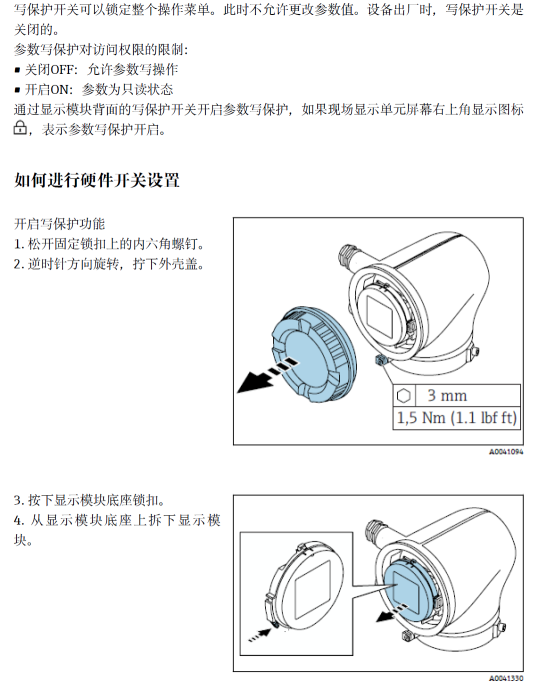
- Open the instrument housing and locate the write protection switch (usually located on the electronics module).
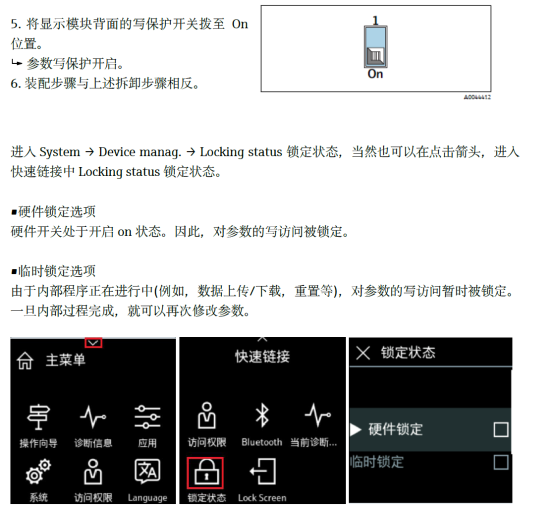
- According to requirements, set the switch to the "ON" (write protection enabled) or "OFF" (write protection disabled) position.
- Reassemble the instrument housing and ensure it is well sealed.
- Power on the instrument and check whether the write protection status is effective.
[Click the image to enlarge]
Precautions and Common Issues
Precautions
- Be sure to power off before operation to avoid damaging electronic components.
- The switch position must be consistent with the software setting, otherwise it may be ineffective.
- After write protection is enabled, all parameter modifications will be prohibited, and it must be disabled first before changes can be made.
Common Issues
| Issue | Possible Cause | Solution |
|---|---|---|
| Write protection cannot be enabled | The switch is not fully toggled or there is a hardware fault | Toggle the switch again or contact technical support |
| Parameters cannot be modified | Write protection is enabled | Set the switch to the OFF position |
Summary
Correctly setting the Promass 10 hardware write protection switch can effectively protect instrument parameters and prevent misoperation. Following the above steps and combining them with actual applications can ensure stable operation of the flowmeter.