
Promass 10 Main Menu Overview
Promass 10 is a Coriolis mass flowmeter launched by Endress+Hauser. Its main menu is designed intuitively, making it easy for engineering technicians to quickly complete parameter settings and diagnostics. Based on official interface screenshots, this article analyzes the hierarchical structure and operation logic of the main menu.
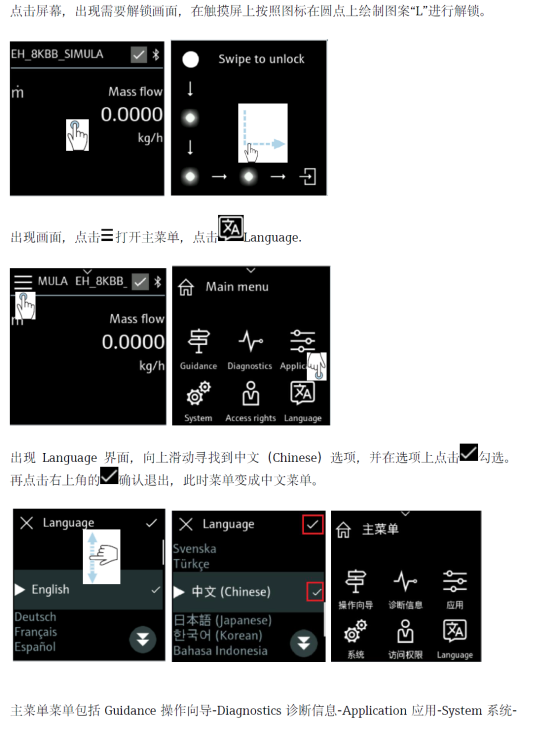
[Click image to enlarge]
Main Menu Core Function Modules
The main menu is the central entry point for device operation and typically includes the following key modules:
- Measured Value Display: Real-time display of process variables such as mass flow, volume flow, density, and temperature.
- Quick Setup: Guides users through basic parameter configuration, such as units, range, and damping.
- Diagnostics and Maintenance: View device status, alarm information, and perform simulation tests.
- Advanced Setup: Includes professional options such as sensor characteristics, output configuration, and communication parameters.
Menu Navigation and Operation Steps
Through the local display or commissioning software, the main menu can be accessed by following these steps:
- After power-on, the display defaults to the measured value page.
- Press the "E" key to enter the main menu, and use the "+"/"-" keys to scroll through entries.
- Press the "E" key to confirm and enter a submenu, and press the "Esc" key to return to the previous level.
- In the parameter editing interface, use the arrow keys to modify values, and press the "E" key again to save.
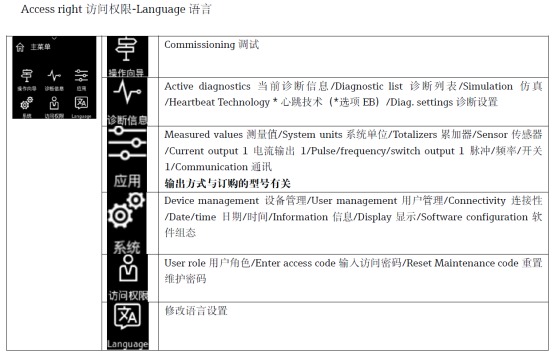
[Click image to enlarge]
Main Menu Parameter Comparison Overview
The following table lists common submenus in the main menu and their typical parameters for quick reference:
| Submenu | Main Parameters | Description |
|---|---|---|
| Measured Values | Mass flow, volume flow, density, temperature | Real-time process variable display |
| Quick Setup | Units, range, damping, current output | Quick configuration of basic parameters |
| Diagnostics | Alarm list, device status, simulation | Troubleshooting and maintenance |
| Advanced Setup | Sensor adjustment, pulse/frequency output, communication | Professional application configuration |
Operating Precautions
- Before modifying parameters, it is recommended to record the original values for restoration.
- Some advanced settings require an access password; refer to the manual for the default password.
- The menu structure may vary slightly depending on the firmware version; please refer to the actual device.
Mastering the Promass 10 main menu structure can significantly improve on-site commissioning and maintenance efficiency, ensuring long-term stable operation of the flowmeter.