
Promass 80 Simulation Pulse Output Overview
Promass 80 is a Coriolis mass flowmeter launched by Endress+Hauser, widely used for flow measurement in chemical, pharmaceutical, food, and other industries. Its simulation pulse output function allows simulation of pulse signal output without actual fluid flow, for system integration testing and verification.
This function is particularly important during Factory Acceptance Testing (FAT) and on-site commissioning, helping engineers verify whether the pulse counting logic of PLCs, DCSs, or batch controllers is correct without introducing actual media.
Application Scenarios of Simulation Pulse Output
Typical Use Cases
- System integration testing: Verify the pulse acquisition and accumulation logic of the host computer before the pipeline is filled with media.
- Troubleshooting: Distinguish whether the issue lies with the flowmeter itself or the downstream control system.
- Batch control verification: Simulate quantitative pulse output to verify the preset count of the batch controller.
- Training demonstration: Demonstrate pulse output behavior in a training environment without process media.
Preparations Before Configuration
Prerequisites
- Confirm that the Promass 80 is properly powered on and the transmitter display is normal.
- Confirm that the pulse output channel is connected to the target device according to the actual wiring requirements.
- Record the current pulse value (e.g., 1 pulse = 0.1 kg) and pulse width settings for restoration after simulation.
- Ensure you have the operating permissions, usually requiring access to the Expert menu or entering the corresponding access password.
Simulation Pulse Output Configuration Steps
Operation via Local Display Interface
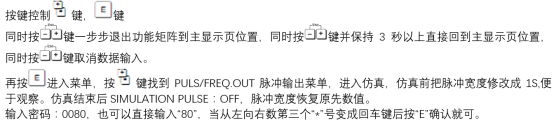
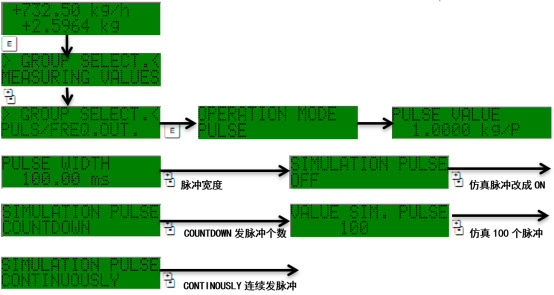
- Enter the main menu and select Setup → Outputs → Pulse Output.
- Find the Simulation Pulse option and set it to On.
- Set the simulation frequency or simulation flow value so that the output pulses are emitted continuously at the set value.
- Observe on the target device side whether the pulse count matches the setting.
- After verification is complete, set the simulation function back to Off to restore normal measurement output.
Key Parameter Description
| Parameter | Description | Typical Setting |
|---|---|---|
| Simulation Pulse | Simulation pulse switch | On / Off |
| Pulse Value | Pulse equivalent | 0.1 kg/pulse |
| Pulse Width | Pulse width | 0.5 ms ~ 200 ms |
| Output Signal | Output type | Active / Passive |
[Click image to enlarge]
Precautions and Common Issues
Operating Precautions
- In simulation mode, the output pulses do not represent actual flow and must not be used for trade settlement or process control.
- After debugging is complete, be sure to turn off the simulation function to avoid affecting normal production metering.
- If the pulse width is set too small, downstream devices may not recognize it. It is recommended to adjust according to the response time of the acquisition card.
- Active/passive output must match the electrical characteristics of downstream devices. If necessary, add relays or isolators.
Troubleshooting Common Issues
- No pulse output: Check whether the simulation switch is on, whether the wiring polarity is correct, and whether the pulse value is reasonable.
- Pulse count deviation: Verify whether the pulse value and the downstream accumulation coefficient are consistent.
- Pulse loss: Appropriately increase the pulse width, or check cable shielding and grounding.
[Click image to enlarge]
Summary
Promass 80 simulation pulse output is an efficient tool during the debugging and verification phase, enabling pulse link integration testing without introducing actual media. Mastering its configuration steps and parameter meanings can significantly improve on-site debugging efficiency and reduce the risk of misjudgment.