
Promass 80 Simulated Current Output Overview
Promass 80 is a Coriolis mass flowmeter launched by Endress+Hauser and is widely used in industrial flow measurement. Its simulated current output function allows users to simulate a 4-20 mA current signal without actual flow, for system commissioning and fault diagnosis.
This function is especially important for engineering technical personnel and procurement personnel, as it can quickly verify the response of the transmitter output loop and downstream receiving equipment.
Application Scenarios of Simulated Current Output
Typical Uses
- Verify the integrity of the current output loop during commissioning
- Isolate the transmitter from the process during troubleshooting
- Calibrate the analog input module of a downstream PLC or DCS
- Simulate flow signals during system joint debugging
Advantages
- No actual fluid passage is required, saving time and cost
- The output current value can be set precisely, improving commissioning accuracy
- Avoids the inability to test due to process condition limitations
Simulated Current Output Setup Steps
The following steps apply to Promass 80 series transmitters. The specific menus may differ slightly depending on the firmware version.
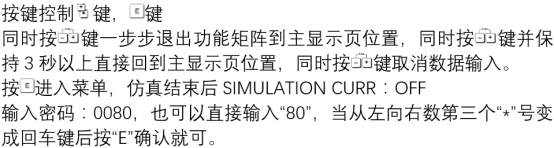
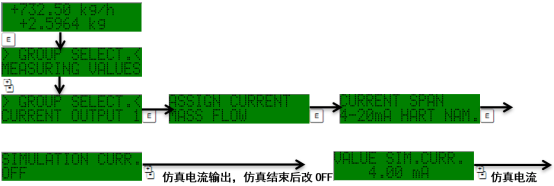
- Enter the transmitter main menu and select the "Diagnostics/Service" or "Simulation" function group.
- Select the "Simulated Current Output" option.
- Set the simulation mode to "On".
- Enter the target current value (e.g., 4 mA, 12 mA, 20 mA) and confirm the output.
- Use a multimeter to measure the current output terminals and verify the actual output value.
- After testing is complete, set the simulation mode to "Off" to restore normal measurement.
Parameter Configuration and Precautions
Key Parameters
| Parameter | Description | Typical Value |
|---|---|---|
| Simulation mode | Turn the simulation function on/off | On |
| Simulated current value | The set output current | 4-20 mA |
| Output range | Corresponding flow range | 0 to maximum flow |
| Alarm response | Alarm behavior during simulation | Hold/Ignore |
Precautions
- During simulation, the actual measured value is ignored and the output is fixed at the set value.
- Make sure to turn it off promptly after simulation ends to avoid affecting normal production.
- The simulated current output may trigger system alarms, so relevant personnel should be notified in advance.
- Only authorized personnel are allowed to operate it to avoid misoperation.
Common Problems and Troubleshooting
No Current Output
- Check whether the simulation mode is turned on
- Confirm that the wiring is correct and the power supply is normal
- Check whether the fuse is blown
Large Current Value Deviation
- Use a high-precision multimeter for measurement
- Check whether the load resistance is within the allowable range
- Recalibrate the current output
If the problem persists, it is recommended to contact Endress+Hauser technical support.