
Promass 80 Startup Display and Key Operation Instructions
Promass 80 is a Coriolis mass flowmeter commonly used in industrial sites. Its startup display and key operations directly affect the efficiency of daily commissioning and maintenance. Based on official materials, this article systematically organizes the startup process, display interface, and key functions for reference by engineering technicians and procurement personnel.
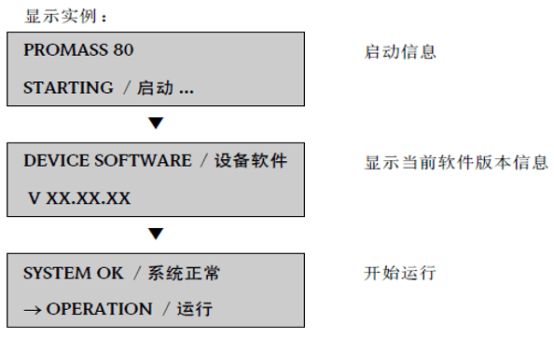
1. Startup Display Process
After the Promass 80 is powered on, it automatically performs a self-test and initialization, and the display screen presents key information in sequence. Correctly understanding the startup display helps quickly determine the device status.
1.1 Power-on Self-test
After the power is turned on, the transmitter first performs an internal self-test, and the screen briefly displays all segments and version information. This process usually lasts a few seconds and is normal.
- Self-test content: Includes detection of the sensor, electronic components, and communication module.
- Display behavior: The screen is fully lit or displays the software version number.
- Abnormal handling: If the self-test fails, the screen displays an error code, and the manual must be consulted to troubleshoot the fault.
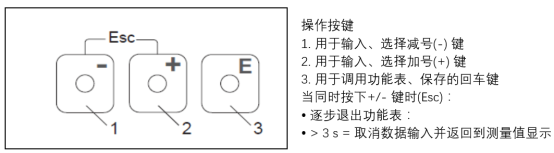
1.2 Main Measurement Interface
After the self-test is completed, the device enters the main measurement interface, which by default displays instantaneous flow and totalized volume. Users can switch between different display variables via keys.
- First line: Usually displays mass flow or volume flow.
- Second line: Displays auxiliary parameters such as totalized volume or temperature.
- Status icons: Alarm or communication status symbols may be displayed at the top of the screen.
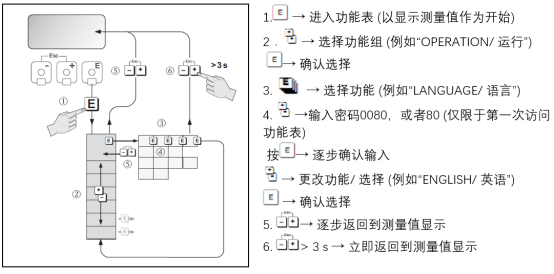
2. Key Operation Instructions
The Promass 80 has a concise key layout, usually including four keys, each corresponding to a different function. Familiarity with key definitions improves operating efficiency.
2.1 Key Function Definitions
The table below lists the standard keys and their main functions, which may vary slightly depending on the model version.
| Key | Symbol | Function Description |
|---|---|---|
| Left key | ← | Move the cursor left in the menu or return to the previous level |
| Right key | → | Move the cursor right in the menu or enter the next level |
| Up key | ↑ | Increase values or scroll up through options |
| Down key | ↓ | Decrease values or scroll down through options |
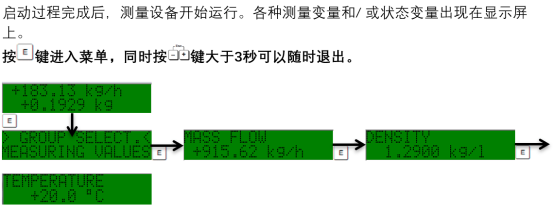
2.2 Typical Operating Steps
The following uses resetting the totalizer as an example to explain the key operation process.
- On the measurement interface, press the right key to enter the main menu.
- Use the up/down keys to select the "Totalizer" menu item, and press the right key to confirm.
- Select the "Reset" option and press the right key to enter.
- Use the up/down keys to select "Yes" or enter the password, and press the right key to confirm execution.
- Press the left key multiple times to return to the measurement interface.
3. Common Issues and Precautions
During operation, abnormal displays or unresponsive keys may be encountered. The following points can help with troubleshooting.
- Garbled display: Check whether the power supply voltage is stable, or contact the manufacturer.
- Keys not responding: Confirm whether it is in a locked state and requires a password to unlock.
- Startup failure: Check the sensor connection and fuse, and restart if necessary.
Correctly performing startup and key operations ensures the long-term stable operation of the Promass 80. For more detailed parameter settings, please refer to the complete user manual.