
Overview of Promass 80 Current Output Range Setting
Promass 80 is a Coriolis mass flowmeter launched by Endress+Hauser, widely used in industrial process measurement. Its current output range setting is a key step in commissioning and operation, and correct range configuration ensures accurate signal transmission. This article introduces the setting method step by step to help you quickly complete the configuration.
Preparation Before Setting
Before starting the setting, please ensure the following conditions are met:
- The Promass 80 transmitter is correctly installed and powered on.
- The operating manual is available or the local display operation method is understood.
- Prepare the necessary tools, such as a small screwdriver (for opening the housing).
- Confirm the output signal type (4-20mA) and the required range.
If using a HART handheld terminal or FieldCare software, connect the communication interface in advance.
Current Output Range Setting Steps
The following steps are based on local display operation, using the keys on the transmitter for setting.
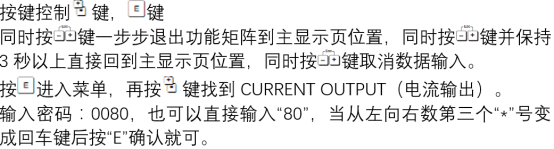
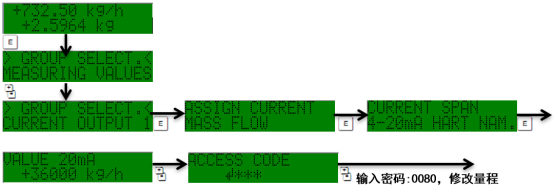
- Enter the main menu: Press the "E" key to enter the main menu, use the "+" or "-" key to select the "Setup" menu, and press "E" to confirm.
- Select current output: In the Setup menu, find "Current output 1" or "Current output 2" (according to the actual wiring), and press "E" to enter.
- Set the range values: Select "Assign current output" and confirm the output variable (such as mass flow). Then select "Current span" to set the values corresponding to 4mA and 20mA. Usually select "4-20mA HART" or "4-20mA".
- Enter the lower range value: Select "Value 4mA", enter the flow value corresponding to 4mA (such as 0 kg/h), and press "E" to confirm.
- Enter the upper range value: Select "Value 20mA", enter the flow value corresponding to 20mA (such as 1000 kg/h), and press "E" to confirm.
- Save the settings: Press the "E" key to save, then press "ESC" to return to the main menu. The settings take effect immediately.
Precautions and Common Issues
Pay attention to the following points during setting to avoid errors:
- Ensure that the upper and lower range values are within the sensor measurement range, otherwise an alarm may occur.
- If the output signal is used for a safety system, confirm that the range meets safety requirements.
- After setting, verify whether the current value is accurate through the simulation output function.
- If using HART communication, the range setting may be affected by the host computer, and consistency must be maintained.
Common issue: If the output current does not change, check whether the wiring is loose or whether the transmitter is in an alarm state.

Parameter Reference and Comparison
The following table lists common parameters and descriptions for the Promass 80 current output range for reference during setting.
| Parameter | Description | Typical Value |
|---|---|---|
| Output type | Current output mode | 4-20mA HART |
| Lower range value (4mA) | Flow value corresponding to 4mA | 0 kg/h |
| Upper range value (20mA) | Flow value corresponding to 20mA | 1000 kg/h |
| Alarm current | Output current during fault | 22mA |
Correctly setting the current output range ensures signal matching between the Promass 80 and the control system, improving measurement accuracy and system stability.