
Increasing Flow Damping Time for Promass 80: Key Steps to Improve Measurement Stability
In industrial flow measurement, the Promass 80 Coriolis mass flowmeter is renowned for its high accuracy and reliability. However, when the fluid in the pipeline has pulsations or bubbles, the measured value may fluctuate. In such cases, appropriately increasing the flow damping time can effectively smooth the output signal and improve measurement stability. This article will guide you on how to set the flow damping time for the Promass 80.
Why Adjust the Flow Damping Time?
The flow damping time determines how quickly the flowmeter responds to flow changes. Increasing the damping time can suppress measurement noise caused by fluid pulsation, vibration, or two-phase flow, but it also reduces the response speed to real flow changes. Therefore, a balance must be struck between stability and response speed.
- Advantages: Reduces signal fluctuations and improves reading repeatability.
- Disadvantages: Extends response time, which may affect fast control loops.
- Applicable scenarios: Occasions with large fluid pulsations that require high stability rather than fast response.
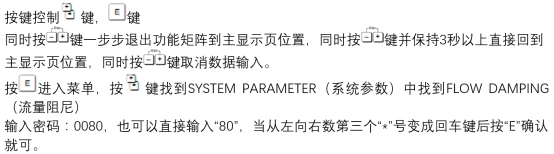
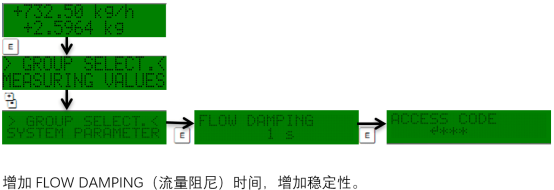
Operating Steps: How to Increase the Flow Damping Time
The following steps apply to Promass 80 series transmitters. The specific menus may vary slightly depending on the firmware version. Please refer to the device manual for operation.
- Enter the transmitter main menu and select "Setup" or "Parameter Setup".
- Find the "Flow Damping Time" or "Damping" option (usually in the "Measurement" or "Output" submenu).
- Enter the desired damping time value, typically in seconds (s).
- Save the settings and exit the menu.
- Observe whether the flow output is stable, and fine-tune if necessary.
Damping Time Setting Reference and Precautions
The choice of damping time depends on the application requirements. The table below provides reference values for typical scenarios, but the actual values need to be determined based on on-site commissioning.
| Application Scenario | Recommended Damping Time (seconds) | Description |
|---|---|---|
| General liquid measurement | 1-3 | Balance stability and response speed |
| Pulsating flow or liquid with gas | 5-10 | Suppress fluctuations and improve stability |
| High-precision batch control | 0.5-1 | Requires fast response, avoid excessive damping |
Note: Excessive damping time may prevent the flowmeter from reflecting actual flow changes in time, affecting process control. It is recommended to verify the system response after adjustment.
Summary
By properly setting the flow damping time of the Promass 80, you can effectively cope with disturbances such as pulsating flow and improve measurement stability. Engineering personnel should refer to the above steps and table for commissioning based on actual working conditions and response requirements. For more detailed guidance, please consult the device manual or contact technical support.