
Function of the Promass 83 Simulation Current Output
Promass 83 is a Coriolis mass flowmeter launched by Endress+Hauser, widely used in the chemical, pharmaceutical, and food industries. Its simulation current output function allows manual setting of a 4-20 mA current value without actual flow, used to verify downstream receiving devices or troubleshoot signal loop faults.
This function is particularly important for engineering commissioning and procurement acceptance, as it can quickly verify the compatibility between the transmitter output module and the PLC/DCS channel.
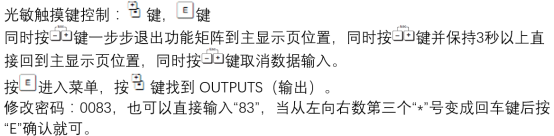
Setup Steps for Simulation Current Output
After entering the transmitter operation menu, follow the process below to enable simulation mode:
- In the main menu, select "Diagnostics/Simulation" or the "Simulation" option.
- Select "Current Output Simulation".
- Enter the target current value, such as 4 mA, 12 mA, or 20 mA.
- After confirmation, the transmitter will output the corresponding current until simulation mode is exited.
Note: During simulation, the actual flow signal is ignored, and process control may be affected. It is recommended to operate offline or in a safe state.
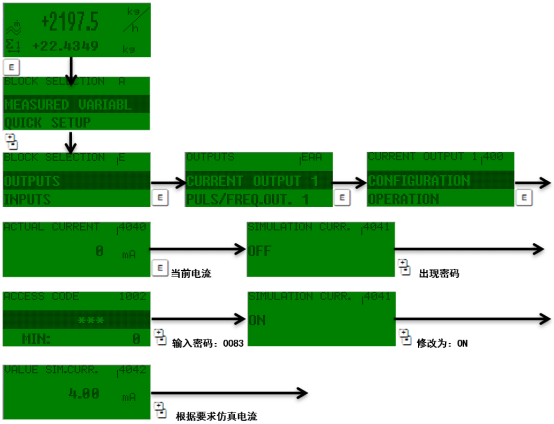
Simulation Mode Parameters and Precautions
Typical Simulation Current Value Reference
| Current Value (mA) | Corresponding Flow Percentage | Typical Use |
|---|---|---|
| 4 | 0% | Zero point verification |
| 12 | 50% | Mid-range verification |
| 20 | 100% | Full-scale verification |
Operating Precautions
- Before simulation output, confirm that downstream devices are allowed to receive simulation signals to avoid unintended actions.
- After simulation ends, be sure to exit the mode and restore actual flow output.
- If the current output is abnormal, check whether the wiring terminals and power supply are normal.
- Some versions require entering an access password to enter the simulation menu.
Common Issues and Troubleshooting
No simulation current output: Check whether the transmitter is in simulation mode and whether the output loop is open.
Large current value deviation: May be due to output module failure or external load resistance exceeding limits. It is recommended to measure with a multimeter.
Unable to enter simulation menu: Confirm the user permission level, and contact the manufacturer for an advanced password if necessary.