
Overview of Promass 80 Flow Unit Modification
Promass 80 is a Coriolis mass flowmeter launched by Endress+Hauser, widely used in industrial process measurement. In practical applications, it is often necessary to modify the system units of instantaneous flow and cumulative flow according to process requirements. This article introduces the modification method step by step, helping engineering and technical personnel and procurement personnel quickly complete the settings.
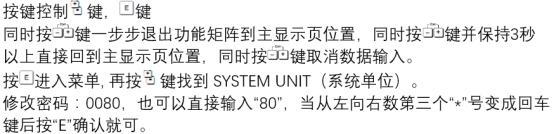
[Click image to enlarge]
Preparation Before Modification
Safety and Permission Confirmation
- Ensure the flowmeter is in measurement stopped or low flow state to avoid affecting the process due to incorrect operation.
- Confirm that you have engineer-level or expert-level access permissions, usually requiring a password.
- Prepare the operation manual to check whether the menu structure is consistent with the on-site instrument version.
Record Original Parameters
Before modification, it is recommended to record the current unit settings for restoration in case of abnormalities. Parameters can be read using the on-site display or commissioning software (such as FieldCare).
Steps to Modify Instantaneous Flow Units
Enter Main Menu
- Press the E key to enter the main menu.
- Use the + or - keys to select "Setup".
- Press the E key to confirm.
Select System Units
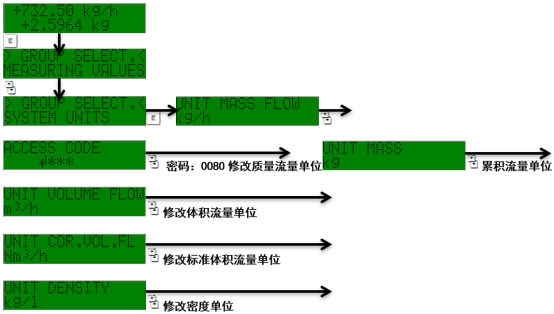
- In the Setup menu, select "System Units".
- Press the E key to enter.
- Select "Mass Flow" or "Volume Flow", depending on the required unit type.
- Press the E key to enter the unit list.
Set Target Unit
- Select the desired unit from the list, such as kg/h, t/h, lb/min, etc.
- Press the E key to confirm, and the screen displays "Selection saved".
- Press the ESC key to return to the previous menu.
Steps to Modify Cumulative Flow Units
Enter Totalizer Settings
- Return to the Setup menu.
- Select "System Units".
- Select "Totalizer".
- Press the E key to enter.
Select Cumulative Unit
- Select "Mass" or "Volume", corresponding to the instantaneous flow unit type.
- Select the target unit from the list, such as kg, t, lb, etc.
- Press the E key to save.
Reset Totalizer (Optional)
After modifying the unit, the cumulative value may need to be reset to avoid unit conversion errors. Enter the "Totalizer" menu, select "Reset" and confirm.
[Click image to enlarge]
Common Unit Options and Conversion Relationships
| Unit Type | Available Units | Conversion Example |
|---|---|---|
| Mass Flow | kg/h, t/h, lb/min, g/s | 1 t/h = 1000 kg/h |
| Volume Flow | m³/h, L/min, gal/min | 1 m³/h = 1000 L/h |
| Cumulative Mass | kg, t, lb | 1 t = 1000 kg |
| Cumulative Volume | m³, L, gal | 1 m³ = 1000 L |
Precautions and Troubleshooting
Verification After Modification
- Check whether the instantaneous flow display value is reasonable and consistent with process expectations.
- Confirm that the cumulative flow unit matches the instantaneous unit to avoid dimensional errors.
- If the display is abnormal, try powering off and restarting or restoring factory settings.
Common Issues
- Unable to enter menu: Check password permissions or hardware lock.
- Incomplete unit list: Confirm that the instrument model and software version support the required units.
- Cumulative value jumps: The totalizer was not reset after modifying the unit, and needs to be manually cleared.
Summary
Through the above steps, the modification of Promass 80 instantaneous and cumulative flow units can be efficiently completed. Correctly setting the system units is the foundation for ensuring flow data accuracy and process control reliability. It is recommended to record parameter changes after operation and calibrate the instrument regularly.