
Promass 83 Startup Display and Optical Touch Key Operating Instructions
Promass 83 is a Coriolis mass flowmeter launched by Endress+Hauser, widely used for precision flow measurement in chemical, pharmaceutical, food, and other industries. Its on-site operation relies on the startup display interface and optical touch keys. Mastering these two parts allows most daily commissioning and parameter viewing tasks to be completed. This article explains the process in three levels: power-on startup, display interface, and touch key operation.
1. Power-On Startup and Self-Test Display
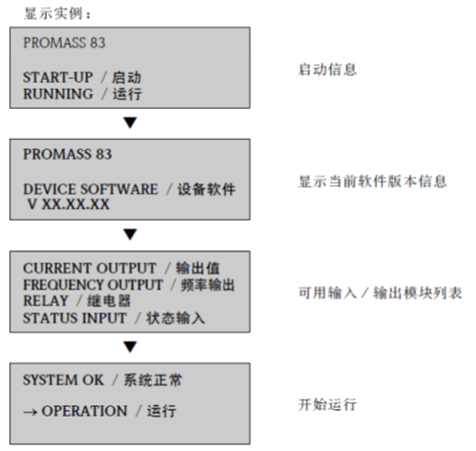
After power is connected, the Promass 83 transmitter automatically enters the startup process, and the display screen sequentially presents self-test and initialization information. The entire process usually lasts several seconds, during which no manual intervention is required.
1.1 Startup Display Process
- At the moment of power-on, the display lights up, and all segments briefly illuminate fully to check whether the display components are normal.
- The software version number and instrument model are displayed to confirm that the transmitter firmware matches the device.
- Entering the self-test stage, the system checks the sensor, electronic modules, and communication status.
- After the self-test passes, it automatically switches to the main measurement interface, displaying real-time data such as instantaneous flow rate and totalized volume.
1.2 Startup Abnormality Indications
If the self-test fails, the display will provide the corresponding error code or alarm information. At this time, the code should be recorded, and the sensor wiring, supply voltage, or grounding should be checked against the manual.
- No display: First check the power supply and fuse.
- Error code: Locate the faulty module according to the code meaning.
- Repeated restarts: Check power quality and grounding resistance.
2. Optical Touch Key Functions and Operation
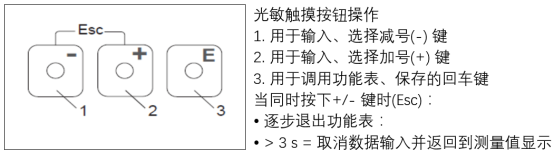
The Promass 83 adopts an optical touch key design, requiring no mechanical pressing and allowing operation through the glass window, making it suitable for on-site environments with high protection rating requirements. The touch keys typically include functions such as "+", "-", "E" (confirm), and "Esc" (return).
2.1 Key Function Reference
| Key | Function | Typical Use |
|---|---|---|
| + | Value increase / menu up | Modify parameters, browse menu |
| - | Value decrease / menu down | Modify parameters, browse menu |
| E | Confirm / enter | Save settings, enter submenu |
| Esc | Return / cancel | Exit menu, discard changes |
2.2 Basic Operating Steps
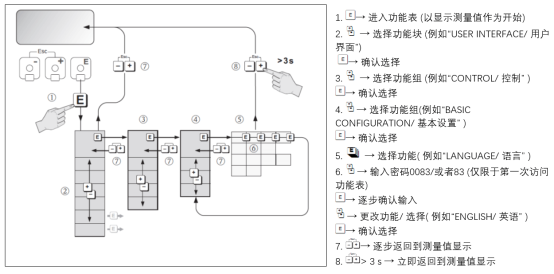
- Lightly touch the corresponding key area with a finger, hold for about 1 second, and release after the display responds.
- Use "+" or "-" to move the cursor in the menu and select the target function group.
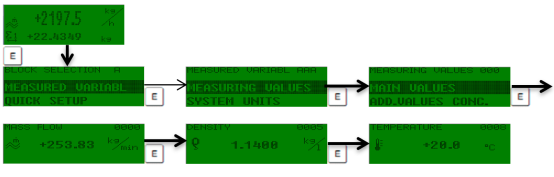
- Press "E" to enter the selected menu, and continue using "+/-" to modify values or options.
- After modification is complete, press "E" to confirm and save, and press "Esc" to return step by step to the main interface.
Note: Optical touch keys are sensitive to light. Avoid direct strong light on the window during operation to prevent false triggering.
3. Operating Key Points and Maintenance Recommendations
Correct use of the startup display and optical touch keys can significantly improve the on-site commissioning efficiency of the Promass 83. The following key points are provided for reference by engineering technicians and procurement personnel.
- After power-on, first confirm that the self-test passes before entering parameter settings.
- Record original values before modifying critical parameters for easy restoration.
- Regularly clean the display window to maintain the sensitivity of the optical touch keys.
- If the touch keys do not respond, check whether the window is contaminated or the ambient light is too strong.
Mastering the above content enables completion of daily startup checks and basic operations of the Promass 83, laying the foundation for stable operation of the flow measurement system.