
Overview of Promass 83 Current Output Range Setting
Promass 83 is a Coriolis mass flowmeter launched by Endress+Hauser, widely used in industrial process measurement. Its current output range setting directly affects the correspondence between the 4-20mA signal and the flow value. Correctly configuring the range can ensure that the PLC/DCS system receives accurate flow signals.
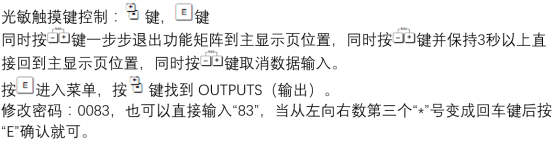
Preparation Before Setting
Required Tools and Conditions
- The Promass 83 flowmeter is powered on and in normal measurement status.
- A local display module or handheld operator with operation permissions.
- Confirm the current output channel (usually channel 1 or channel 2) and the corresponding flow variable.
Safety Precautions
- Before setting, ensure that there is no dangerous medium leakage in the process pipeline.
- If the flowmeter is used in a safety interlock system, operation permission must be obtained first.
Current Output Range Setting Steps
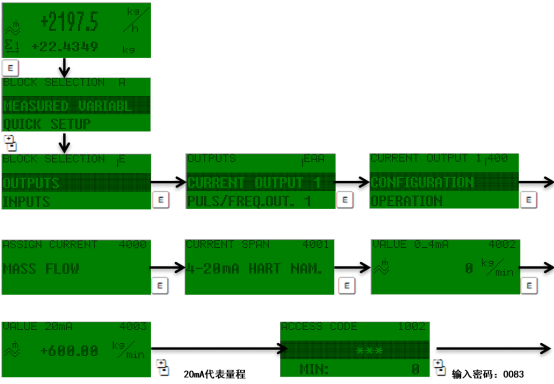
Step 1: Enter the Output Setting Menu
- Press the E key to enter the main menu.
- Use the + or - key to select "Setup" → "Current output 1" or "Current output 2".
- Press the E key to confirm and enter.
Step 2: Configure Range Parameters
- Assign current output: Select the corresponding process variable (such as mass flow, volume flow).
- Current span: Select 4-20mA (standard) or 0-20mA.
- Value 0%: Set the flow value corresponding to 4mA (usually 0).
- Value 100%: Set the full-scale flow value corresponding to 20mA.
Step 3: Save and Exit
- Press the E key to save each parameter.
- Press the E key repeatedly to return to the measurement interface.
- Confirm that the displayed value is stable and there is no alarm prompt.

Range Setting Parameter Reference Table
| Parameter | Typical Value | Description |
|---|---|---|
| Current span | 4-20mA | Standard industrial signal, 4mA corresponds to 0%, 20mA corresponds to 100% |
| Value 0% | 0 kg/h | Can be set to a non-zero value according to process requirements |
| Value 100% | Maximum flow | Recommended to be 1.1~1.2 times the actual maximum flow |
| Failsafe mode | 22mA | Outputs high-limit alarm in case of fault |
Verification and Common Problems
Verification Methods
- Use a multimeter to measure the output current and confirm that it corresponds to the displayed flow.
- Check whether the signal is linear on the DCS side.
Common Problems
- Output is always 4mA: Check whether the variable is not assigned or the range setting is incorrect.
- Output exceeds 20mA: Check the failsafe mode setting or whether the process flow exceeds the range.
- Signal fluctuates greatly: Confirm whether the damping time setting is reasonable.
Summary
Correctly setting the Promass 83 current output range is the key to ensuring accurate transmission of flow signals. Following the above steps, combined with the parameter table and verification methods, commissioning can be completed quickly. For more detailed guidance, please refer to the device manual or contact the manufacturer's technical support.