
Promass 83 Flow Unit Modification Overview
Promass 83 is a high-precision Coriolis mass flowmeter launched by Endress+Hauser, widely used for flow measurement in industries such as chemical, pharmaceutical, and food. In actual engineering, it is often necessary to modify the system units of instantaneous flow and cumulative flow according to process requirements or host computer system settings.
Based on on-site operation experience, this article provides complete unit modification steps to help instrument engineers and procurement personnel quickly complete configuration.
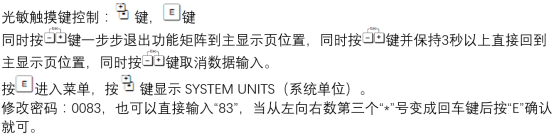
Preparation Before Modification
Before modifying units, please ensure the following checks are completed to avoid measurement deviations caused by misoperation.
- Confirm that the flowmeter is powered on and in normal measurement status.
- Record the current unit settings so they can be restored if needed.
- Ensure you have engineer authority or the corresponding password (usually 83 by default).
- If the flowmeter is connected to DCS or PLC, the host computer units must be modified synchronously to remain consistent.
Steps to Modify Instantaneous Flow Units
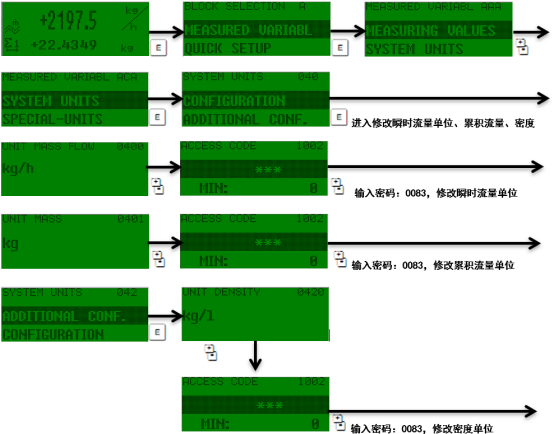
The instantaneous flow unit determines how the current flow value is displayed, such as kg/min, t/h, or lb/s. Please follow these steps:
- Enter the main menu and select "Setup".
- Select "System Units".
- Select "Mass Flow" or "Volume Flow", depending on your measurement variable.
- Select the target unit from the list, such as kg/h, t/h, or lb/min.
- After confirmation, press "Enter" to save, and return to the main interface to check whether the displayed value has updated.
Note: If measuring volume flow, also confirm that the reference density setting is correct; otherwise, unit conversion may be incorrect.
Steps to Modify Cumulative Flow Units
The cumulative flow unit affects the total display, such as kg, t, or lb. The modification steps are similar to instantaneous flow, but note whether the cumulative value needs to be reset.
- Enter "Setup" → "System Units".
- Select "Totalizer" or "Totalizer 1/2/3" (depending on configuration).
- Select the corresponding cumulative unit, such as kg, t, lb.
- Confirm and save. At this point, the cumulative value may automatically convert according to the new unit, but it is recommended to manually reset the totalizer to ensure measurement starts from zero.
In some versions, the totalizer unit is linked with the instantaneous flow unit. After modifying the instantaneous unit, the cumulative unit will automatically update. Please verify carefully.
Common Unit Options and Conversion Reference
Promass 83 supports multiple mass and volume flow units. The table below lists common options and typical application scenarios.
| Unit Type | Available Units | Typical Applications |
|---|---|---|
| Mass Flow | kg/h, kg/min, t/h, lb/min | Chemical batching, trade settlement |
| Volume Flow | m³/h, L/min, gal/min | Water treatment, oil transportation |
| Cumulative Mass | kg, t, lb | Batch control, loading metering |
| Cumulative Volume | m³, L, gal | Tank gauging, total flow |
Precautions and Troubleshooting
If display abnormalities or communication interruptions occur after modifying units, refer to the following points for troubleshooting.
- Unit not taking effect: Check whether it has been saved and exited from the menu, or try powering off and restarting.
- Cumulative value jumps: Unit switching may cause the cumulative value to be recalculated according to the new unit. This is normal; reset if necessary.
- Inconsistent with host computer: The range and units in the DCS/PLC must be modified synchronously; otherwise, the displayed value will be incorrect.
- Insufficient authority: Confirm that the correct engineer password is entered to avoid read-only mode.
If the problem persists, it is recommended to contact Endress+Hauser technical support or consult the corresponding version of the operating manual.
Summary
Modifying the instantaneous flow and cumulative flow units of the Promass 83 is a common on-site operation and can be completed through the Setup → System Units menu. The key points are to save the settings, synchronize the host computer, and reset the totalizer if necessary. Following the steps in this article can effectively improve the accuracy and consistency of the metering system.