
Overview of Promass 83 User Interface Settings Modification
Promass 83 is a classic Coriolis mass flowmeter under Endress+Hauser, widely used for flow measurement in chemical, food, pharmaceutical, and other industries. Its on-site display and operation module supports flexible user interface configuration, allowing adjustment of display language, backlight, contrast, and engineering units according to working conditions and personnel habits.
Properly configuring the user interface not only improves on-site reading efficiency but also reduces the risk of misoperation. The following sections introduce modification steps by functional module, all performed through the instrument's local display panel or configuration software.
Entering the User Interface Settings Menu
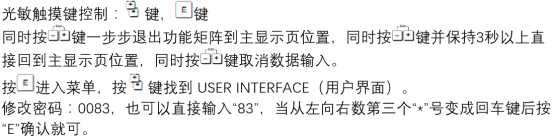
Before modifying any interface parameter, you must first enter the correct function group. The Promass 83 uses a hierarchical menu structure, with user interface-related options concentrated in the "Setup" and "Display" submenus.
Operating Steps
- Confirm the instrument is in measurement mode and press the E key to enter the main menu.
- Use the + / - keys to select "Setup" and press E to confirm.
- Continue to select interface-related items under "Display" or "System".
- Enter the password (if access protection is enabled). The default factory password can be found in the accompanying manual.
After entering, you will see a list of adjustable parameters such as language, backlight, and contrast.
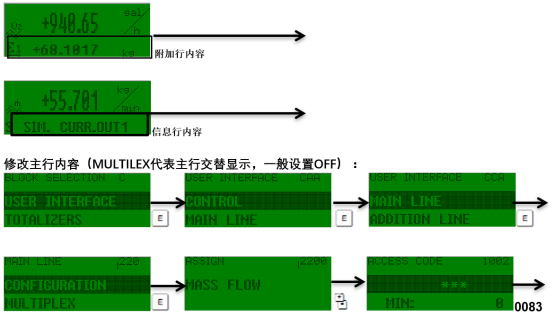
Modifying Common User Interface Parameters
Different applications have significantly different interface requirements. The table below summarizes the most commonly adjusted parameters and their functions, making it easy for engineering personnel to choose as needed.
Comparison of Main Adjustable Parameters
| Parameter | Function Description | Typical Options | Recommendation |
|---|---|---|---|
| Language | Display language | English, German, Chinese, etc. | Set according to on-site personnel habits |
| Backlight | Backlight brightness | On/Off, multiple brightness levels | Recommended to turn on in dim environments |
| Contrast | LCD contrast | Multiple adjustable levels | Fine-tune according to viewing angle |
| Unit | Display engineering units | kg/h, t/h, L/min, etc. | Keep consistent with the host system |
| Access Code | Access password | 4-digit number | Prevent accidental modification of critical parameters |
Modifying Language and Display Units
- In the Display menu, select Language, use + / - to switch to the target language, then press E to save.
- In System Units, select the corresponding units for mass flow, volume flow, density, etc.
- After modification, return to the measurement interface and confirm that the displayed value units have been updated accordingly.
Adjusting Backlight and Contrast
- Backlight: Can be set to always on, on keypress, or off to extend the display module's lifespan.
- Contrast: Adjust appropriately under strong light or low-temperature environments to ensure clear readability of digits.
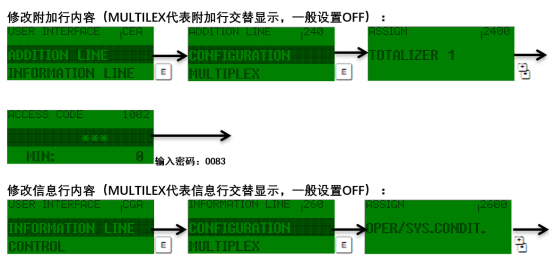
Setting Access Password and Restoring Defaults
To prevent unauthorized personnel from modifying the interface and measurement parameters, it is recommended to enable an access password. If the configuration becomes disordered, you can also restore the initial interface state by restoring factory settings.
Password Protection Settings
- Enter Setup → System → Access Code.
- Enter a custom 4-digit numeric password and confirm.
- After exiting the menu, the password will be required to enter again.
Restoring Factory Interface Settings
- Enter Setup → System → Reset.
- Select "Restore Factory Settings".
- After confirmation, the instrument restarts and interface parameters return to default values.
Note: Restoring factory settings may clear some calibrated configurations. Please record key parameters before operation.

Common Issues and Precautions
- Modifying interface parameters does not affect measurement accuracy, but unit changes will affect displayed values.
- If the menu cannot be entered, check whether password protection or the write protection switch is enabled.
- After on-site modifications, it is recommended to record the changes for future maintenance and auditing.
- For trade settlement applications, the interface units should be consistent with the metering agreement.
By mastering the above methods, you can quickly complete personalized configuration of the Promass 83 user interface, improving on-site operation and maintenance efficiency.