
Promass 83 Low Flow Cut Off Setting Overview
Low Flow Cut Off is an important function of the Promass 83 mass flowmeter, used to force the output to zero when the flow rate is below a set threshold, thereby avoiding measurement fluctuations and false accumulation caused by fluid pulsation or bubbles. Correctly setting this parameter can improve the stability of process control, especially suitable for batch processing, dosing, and other occasions requiring precise cutoff.
Based on the Promass 83 transmitter, this article introduces the configuration steps and key points of Low Flow Cut Off for reference by engineering technicians and procurement personnel.
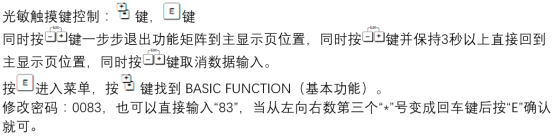
Low Flow Cut Off Parameter Setting Steps
Entering the Parameter Menu
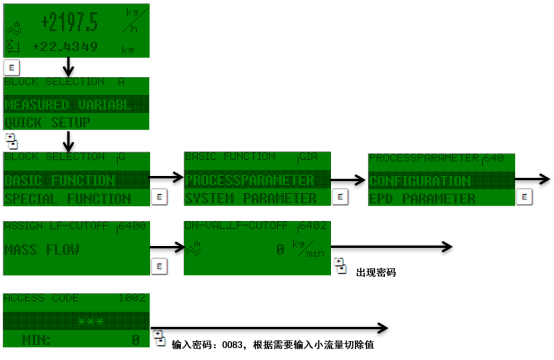
Access the transmitter parameters via the local display or commissioning tools (such as FieldCare, Simatic PDM). The main menu path is usually: Setup → Advanced Setup → Sensor → Low Flow Cut Off. Different firmware versions may vary slightly; please refer to the actual menu.
Setting the Cut Off Value
Enter the desired flow threshold in the Low Flow Cut Off parameter, with the unit consistent with the current flow unit (e.g., kg/h, t/h). It is recommended to set it based on the process minimum flow and noise level, typically 1%~5% of the full scale.
Confirm and Save
After entering, press the confirm key to save, and the transmitter will automatically apply the new setting. It is recommended to verify the cut off effect under empty pipe or low flow conditions.
Precautions and Recommended Values
- Avoid setting too high: An excessively high cut off value will cause small flows to be ignored, affecting accumulation accuracy.
- Consider fluid characteristics: For fluids containing bubbles or pulsating flow, appropriately increase the cut off value, but evaluate the impact on measurement.
- Unit consistency: Ensure the cut off value unit is consistent with the display unit to prevent incorrect settings.
- Record parameters: After changes, record the original values for easy fault recovery.
| Application Scenario | Recommended Cut Off Value (% of Full Scale) |
|---|---|
| Clean liquids | 1%~2% |
| Liquids with bubbles | 3%~5% |
| High-viscosity fluids | 2%~4% |
Common Problems and Troubleshooting
Flow display still fluctuates after cut off
Check if it is caused by pipeline vibration or installation stress; try adjusting the damping time or re-zeroing.
Unable to enter the parameter menu
Confirm whether write protection is enabled; you need to enter a password or unlock via hardware.
Correctly setting the Low Flow Cut Off can effectively improve the measurement reliability of the Promass 83. It is recommended to review it regularly according to process requirements.