
Promass 300/500 Factory Reset Overview
Promass 300/500 is a high-performance mass flowmeter launched by Endress+Hauser, widely used for flow measurement in chemical, petroleum, food, and other industries. When the instrument experiences parameter confusion, communication abnormalities, or requires reconfiguration, factory reset is a quick and effective solution.
This article introduces three commonly used factory reset methods and explains the precautions before and after the operation to help engineering technicians and procurement personnel correctly perform this operation.
Preparation Before Factory Reset
Before performing the reset operation, be sure to confirm the following items to avoid data loss or production interruption.
- Back up current parameters: Export the instrument configuration via FieldCare or the Web server so that it can be quickly restored after reset.
- Confirm process status: Ensure the flowmeter is in a safe state, and isolate the pipeline or stop the process if necessary.
- Record key parameters: Such as measurement units, range, damping, empty pipe detection, etc., to facilitate subsequent reconfiguration.
- Permission confirmation: The reset operation usually requires a high-level access permission (such as maintenance mode or expert mode).
Method 1: Reset via Local Display Interface
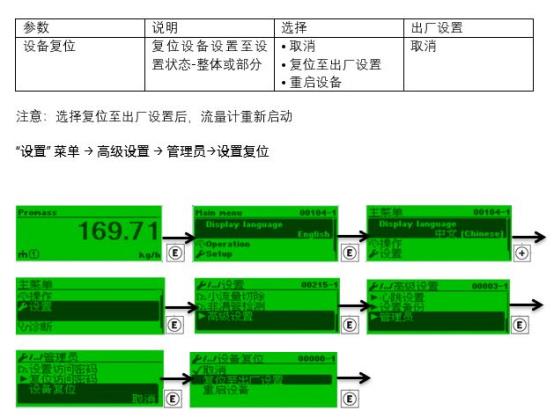
Applicable to Promass 300/500 transmitters equipped with a local display module. The operation steps are as follows:
- Press the E key to enter the main menu.
- Use the + or - keys to navigate to the "Setup" menu.
- Select "Advanced setup", then enter "Factory reset".
- Select "Factory reset" or "Factory reset (partial)" according to requirements.
- Confirm the operation and enter the password (the default may be "0000" or a user-defined password).
- Wait for the instrument to restart. After the reset is complete, the main measurement interface will be displayed.
Note: Partial reset only resets user parameters, while a full reset will clear all configurations, including calibration coefficients.
Method 2: Reset via FieldCare Software
FieldCare is Endress+Hauser's asset management tool, which can connect to the instrument via HART, PROFIBUS, Modbus, and other protocols.
- Start FieldCare and establish a connection with the Promass 300/500.
- In the device tree, right-click the instrument and select "Device functions" > "Factory reset".
- Select the reset type: "Factory setting" or "Delivery status".
- Click "Execute" and confirm the warning prompt.
- Wait for the progress bar to complete. The instrument will automatically restart.
This method is suitable for remote operation, but stable communication must be ensured.
Method 3: Reset via Web Server
The Promass 300/500 has a built-in Web server, which can be accessed via the Ethernet interface.
- Connect the computer and the transmitter to the same network, open a browser, and enter the instrument IP address.
- After logging in, go to "Setup" > "Advanced setup" > "Factory reset".
- Select the reset option and click "Start".
- After confirmation, wait for the instrument to restart.
The Web server method is intuitive and easy to use, suitable for on-site commissioning personnel.
Inspection and Reconfiguration After Factory Reset
After the reset is complete, the instrument will return to its initial state, and the following settings need to be reconfigured:
- Measurement units: Set units for mass flow, volume flow, density, etc., according to process requirements.
- Range and damping: Adjust the range and damping time corresponding to the 4-20 mA output.
- Empty pipe detection: Re-enable and set the threshold.
- Communication parameters: Such as HART address, PROFIBUS node address, Modbus baud rate, etc.
- Calibration coefficients: If fully reset, the sensor calibration coefficients need to be re-entered or calibration performed.
It is recommended to use a backup file for quick restoration to reduce downtime.
Common Problems and Precautions
| Problem | Possible Cause | Solution |
|---|---|---|
| Unable to communicate after reset | Communication parameters were reset | Re-set the address, baud rate, etc. |
| Abnormal measurement values | Calibration coefficients lost | Re-enter calibration coefficients or perform calibration |
| Display shows password error | Password was modified | Use the default password or contact the manufacturer |
| Power failure during reset | Causes firmware damage | Power on again, and return to factory for repair if necessary |
Important note: Factory reset will clear all user-defined parameters. Be sure to back up in advance. If unsure about the operation, it is recommended to contact Endress+Hauser technical support.