
Promass 300/500 Cumulative Flow Reset to Zero Overview
During long-term operation of Promass 300/500 series mass flowmeters, the cumulative flow value may need to be reset to zero due to process requirements or maintenance needs. Correctly performing cumulative flow reset ensures measurement accuracy and data reliability. This article is based on the Endress+Hauser official operation manual and provides detailed steps and precautions.
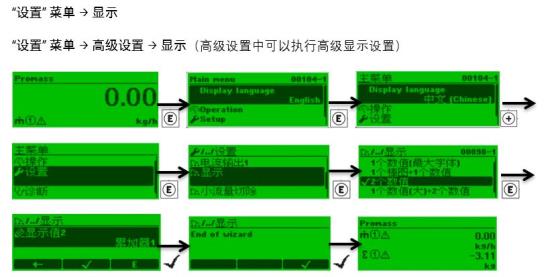
Preparation Before Operation
Safety and Permission Confirmation
- Ensure the process has been stopped or is in a safe state to avoid affecting production due to incorrect operation.
- Confirm that the operator has instrument operation permissions (such as password level).
- Record the current cumulative flow value for later comparison or audit.
Tools and Materials
- HART handheld communicator, FieldCare, or local display interface.
- Instrument parameter manual or quick setup guide.
Cumulative Flow Reset to Zero Steps
Operation via Local Display Interface
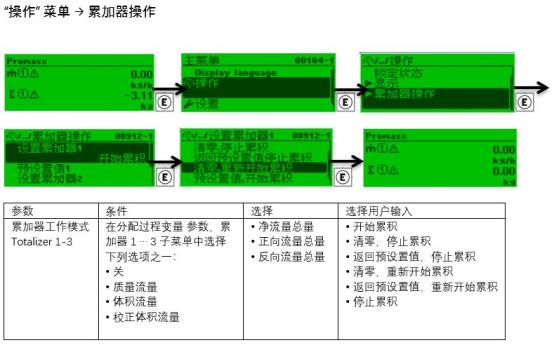
- Enter the main menu and select "Operation" -> "Totalizer".
- Select the totalizer to be reset (such as mass, volume, or corrected volume).
- Press the "Reset" or "Clear" option and confirm execution.
- Enter the password (if required) and wait for the reset completion prompt.
Operation via HART Handheld Communicator or FieldCare
- Connect the handheld communicator or software to the instrument.
- Navigate to "Diagnostics/Service" -> "Totalizer Reset".
- Select the target totalizer and execute the reset.
- Confirm the operation is successful and exit the menu.
Comparison of Reset Methods
| Reset Method | Applicable Scenario | Advantages | Precautions |
|---|---|---|---|
| Local display interface | On-site operation, no additional tools required | Intuitive and quick | Requires proximity to the instrument, may be limited by environment |
| HART handheld communicator | Remote or hazardous areas | Flexible, can be operated remotely | Requires carrying the handheld communicator and connecting to the loop |
| FieldCare software | Commissioning and maintenance | Comprehensive functions, supports batch operations | Requires a computer and communication interface |
Common Issues and Solutions
Reset Failure or Ineffectiveness
- Check whether the totalizer lock has been released (such as the "Hold" function).
- Confirm whether the password permission is correct.
- Ensure the instrument is not in write-protected state.
Cumulative Flow Not Zeroed After Reset
- Confirm that the correct totalizer channel has been selected.
- Check whether an external totalizer reset signal has been triggered.
- Try powering off and on again or restoring factory settings (operate with caution).
Precautions and Best Practices
- Always record the original data before resetting for traceability.
- Avoid resetting during process operation to prevent measurement errors.
- Regularly back up instrument parameters to prevent accidental loss.
- Follow the Endress+Hauser official manual for operations to ensure compliance.
Through the above steps, you can safely and accurately complete the cumulative flow reset to zero for Promass 300/500. If you have any questions, please contact Endress+Hauser technical support.