
Overview of Promass 300/500 Modbus Communication Parameter Setting
Promass 300/500 is a high-precision flowmeter under KROHNE that supports the Modbus communication protocol and can be easily integrated into industrial automation systems. Correctly setting the Modbus parameters is a prerequisite for reliable data exchange. This article will guide you step by step through parameter configuration to ensure stable communication.
Preparation Before Setup
Before starting configuration, please ensure the following conditions are met to avoid operation interruption or equipment damage.
- Confirm that the Promass 300/500 is properly powered and in operating status.
- Prepare Modbus master devices (such as PLC, DCS, or host computer) and communication cables.
- Obtain the device manual to understand default communication parameters (such as address, baud rate, etc.).
- Ensure the operator has instrument configuration permissions.
Modbus Communication Parameter Configuration Steps
The following steps apply to local or remote configuration of the Promass 300/500. Please operate according to the actual interface.
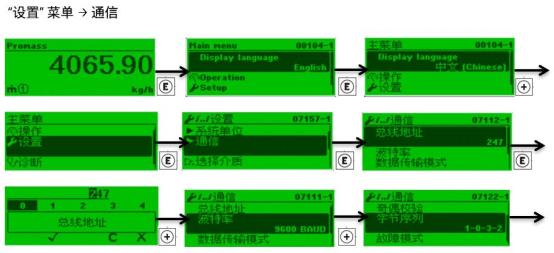
- Enter the communication settings menu: Navigate to the "Communication" or "Modbus" settings option through the device display or debugging software.
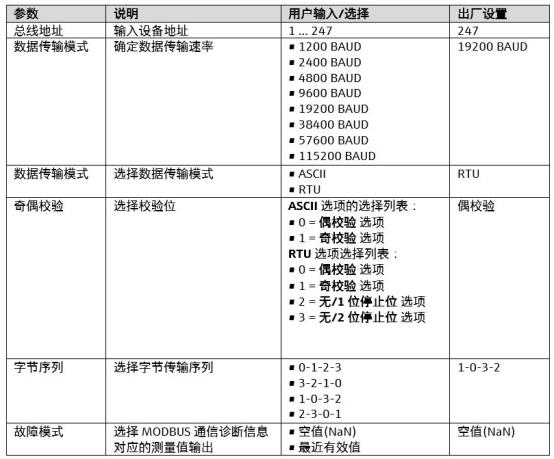
- Set the slave address: Assign a unique Modbus slave address (range 1-247) to each flowmeter to avoid address conflicts.
- Select the baud rate: Set the baud rate according to the master station requirements. Common values include 9600, 19200, 38400, etc., and must be consistent with the master station.
- Configure the data format: Set the data bits, stop bits, and parity method (such as 8 data bits, 1 stop bit, no parity).
- Save and restart: After saving the parameters, restart the device to make the configuration effective.
Key Parameter Description
The table below lists commonly used parameters in Modbus communication and their recommended settings for quick reference.
| Parameter | Description | Recommended Value |
|---|---|---|
| Slave Address | Unique identifier of the device in the Modbus network | 1-247 (avoid duplication) |
| Baud Rate | Communication speed, must match the master station | 19200 bps |
| Data Bits | Number of data bits per character | 8 bits |
| Stop Bits | Character end marker | 1 bit |
| Parity | Error detection method | None |
Verifying Communication and Troubleshooting
After configuration is complete, verify whether communication is normal. If problems occur, refer to the following methods for troubleshooting.
- Use Modbus debugging tools to read device registers and confirm data response.
- Check whether cable connections are secure and whether terminal resistors match.
- Confirm that master and slave parameters are completely consistent, including baud rate, data format, etc.
- If communication fails, try lowering the baud rate or replacing the cable.
By following the above steps, you can efficiently complete the Modbus communication parameter setting for the Promass 300/500, ensuring stable communication between the flowmeter and the control system.