
T-mass 65 Simulation Pulse Output Overview
T-mass 65 is a thermal mass flowmeter launched by Endress+Hauser, widely used for gas flow measurement. Its simulation pulse output function allows users to simulate pulse signal output without actual fluid flow, for system testing, calibration, and troubleshooting.
This function helps engineering technicians verify the response of downstream devices (such as flow computers, PLCs) and ensure the correctness of the entire measurement chain.
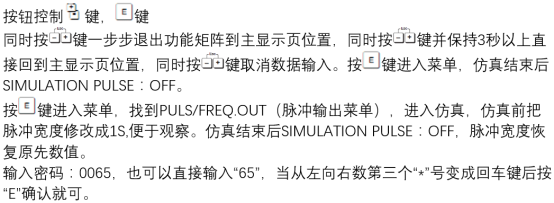
Purpose and Advantages of Simulation Pulse Output
Main Purposes
- Verify whether the pulse output channel and wiring are correct
- Test the counting and processing capability of downstream devices for pulse signals
- Simulate flow signals under no-flow conditions for system joint debugging
Advantages
- Improve commissioning efficiency: Complete signal testing without actual gas flow
- Reduce risk: Avoid equipment damage caused by wiring errors
- Facilitate maintenance: Quickly locate faults related to pulse output
Configuration Steps for Simulation Pulse Output
The following steps are applicable for configuration via local display or debugging software (such as FieldCare).
- Enter the transmitter menu and select "Diagnostics/Simulation" or a similar option.
- Select "Pulse Output Simulation".
- Set the simulation pulse frequency or pulse equivalent (e.g., how much volume flow each pulse represents).
- Start the simulation and observe the output signal and downstream device response.
- After testing is complete, turn off the simulation and return to normal measurement mode.
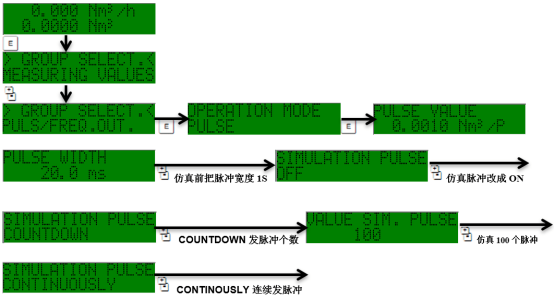
Key Parameters and Settings Description
| Parameter | Description | Typical Value |
|---|---|---|
| Pulse equivalent | Flow volume represented by each pulse | 0.1 L/P or 1 L/P |
| Pulse width | Duration of the output pulse | 0.1 ms ~ 100 ms |
| Maximum frequency | Highest pulse frequency that can be set during simulation | 5 kHz |
| Output type | Active/passive pulse | Depends on hardware configuration |
Precautions and Common Issues
Precautions
- During simulation, actual flow measurement is paused, and the output signal does not represent real flow.
- Ensure downstream devices are ready to receive the simulation signal to avoid false actions.
- After simulation ends, be sure to return to normal measurement mode.
Common Issues
- No pulse output: Check wiring, power supply, and output type settings.
- Inaccurate pulse frequency: Confirm that the pulse equivalent setting matches the downstream device.
- Simulation cannot start: May be due to permission restrictions or the transmitter being in write-protected state.
Summary
The simulation pulse output function of the T-mass 65 is a practical tool for commissioning and maintenance. Correctly configuring and using this function can significantly improve system integration efficiency and reliability. It is recommended that engineering technicians carefully read the manual before operation and follow safety regulations.