
T-mass 65 Pressure Commissioning Overview
T-mass 65 is a thermal gas mass flowmeter launched by Endress+Hauser, widely used for flow measurement of compressed air, nitrogen, natural gas, and other gases. The correct setting of pressure parameters directly affects measurement accuracy, so pressure compensation configuration must be emphasized during commissioning.
This article is intended for engineering technicians and procurement personnel, providing the quick setup process and key points for T-mass 65 pressure commissioning, helping users complete instrument commissioning in the shortest time.
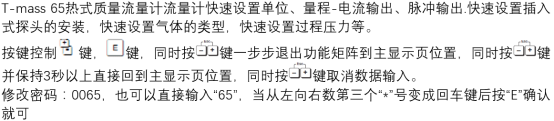
Pre-Commissioning Preparation
Required Tools and Materials
- T-mass 65 operating manual and nameplate parameters
- Actual on-site working pressure value (absolute or gauge pressure)
- HART handheld communicator or FieldCare commissioning software
- Multimeter (for loop inspection)
Safety Precautions
- Confirm the pipeline has been depressurized to avoid working under pressure
- Check that electrical connections meet explosion-proof area requirements
- Record original parameters for restoration in case of abnormalities
Pressure Parameter Quick Setup Steps
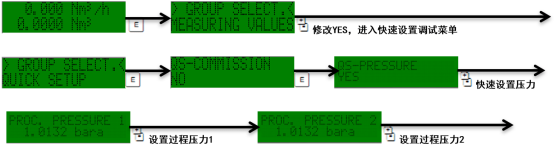
Step 1: Enter the Commissioning Menu
- Power on the instrument and wait for self-check to complete
- Enter the Setup menu via HART handheld communicator or local display
- Select the Process Parameter submenu
Step 2: Configure Pressure Parameters
- Select the Pressure option
- Enter the actual on-site working pressure value
- Select the pressure unit (bar, kPa, MPa, or psi)
- Confirm the pressure type: Absolute or Gauge
Step 3: Save and Verify
- Press the confirm key to save the settings
- Return to the main interface to check whether the flow display is stable
- Compare with actual working conditions and fine-tune the pressure value if necessary
Key Parameter Comparison Table
| Parameter Item | Recommended Setting | Description |
|---|---|---|
| Pressure Type | Absolute / Gauge | Select according to process requirements |
| Pressure Unit | bar / kPa / MPa | Keep consistent with on-site instruments |
| Pressure Value | Actual working condition value | Error recommended to be controlled within ±1% |
| Medium Type | Air / Nitrogen / Natural Gas | Affects compensation coefficient |
Common Problems and Troubleshooting
Large Flow Display Deviation
- Check whether the pressure value is consistent with actual working conditions
- Confirm the pressure type selection is correct (absolute vs. gauge)
- Verify whether the medium type setting matches
Instrument Cannot Save Parameters
- Confirm whether the instrument is in write protection status
- Check whether HART communication is normal
- If necessary, restore factory settings and reconfigure
Summary
The core of T-mass 65 pressure commissioning is to accurately enter the working condition pressure value and select the correct pressure type. Through the above quick setup steps, engineering personnel can complete parameter configuration within a few minutes, ensuring flow measurement accuracy.
It is recommended to record all parameters after commissioning is completed, facilitating subsequent maintenance and troubleshooting.