
Overview of Prowirl 72 Simulation Pulse Output
Prowirl 72 is a vortex flowmeter launched by Endress+Hauser, widely used for flow measurement of steam, gases, and liquids. Its simulation pulse output function allows simulating pulse signal output without actual flow, for system integration testing and verification.
This function is of great value in engineering commissioning, PLC/DCS channel testing, and metering system acceptance. Through the simulation pulse output, it is possible to quickly confirm on site whether the signal chain is normal.
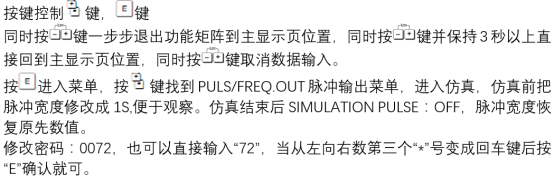
Working Principle of Simulation Pulse Output
Basic Mechanism of Pulse Output
The pulse output of Prowirl 72 is usually proportional to volumetric flow or mass flow. Each pulse represents a certain accumulated flow, and the pulse equivalent can be set in the parameters.
In simulation mode, the instrument internally generates a fixed-frequency pulse signal to replace the real flow signal, thereby simulating the output behavior.
Differences Between Simulation Mode and Real Mode
| Comparison Item | Real Pulse Output | Simulation Pulse Output |
|---|---|---|
| Signal Source | Actual flow sensor | Internal signal generator |
| Purpose | Normal metering | Commissioning and verification |
| Output Frequency | Varies with flow | Fixed or configurable |
| Impact on System | Participates in metering | Used only for testing |
Configuration Steps for Simulation Pulse Output
Preliminary Preparation
- Confirm that the Prowirl 72 is properly powered and in operating state
- Prepare a HART handheld communicator or commissioning software (such as FieldCare)
- Confirm that the pulse output terminals are correctly wired to the test equipment
Parameter Setting Procedure
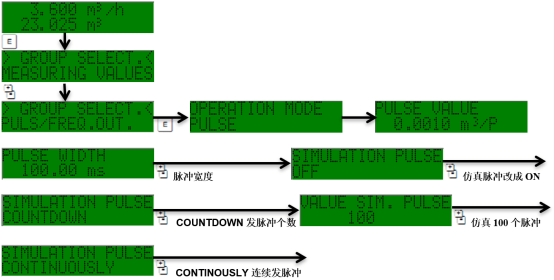
- Enter the instrument menu and select the Output Settings option
- Find the Simulation submenu
- Select the Pulse Output Simulation mode
- Set the simulation frequency or pulse equivalent
- Save the parameters and exit the menu
Verification and Precautions
Verification Methods
- Use an oscilloscope or frequency counter to measure the pulse output terminals
- Confirm that the pulse frequency matches the set value
- Check whether the counting on the PLC/DCS side is normal
Key Precautions
- Simulation mode is only for commissioning, and must be turned off after commissioning is completed to avoid affecting normal metering
- During simulation, the instrument does not reflect actual flow, and it must not be used for trade settlement
- It is recommended to record the original parameters before simulation for easy restoration
- If there is no pulse output, check whether the wiring polarity and load resistance match
Common Problems and Solutions
| Symptom | Possible Cause | Recommended Action |
|---|---|---|
| No pulse output | Simulation not activated or wiring error | Check simulation status and terminal wiring |
| Large frequency deviation | Incorrect pulse equivalent setting | Recheck the parameters |
| Unstable signal | Electromagnetic interference or load mismatch | Check shielding and load resistance |
Summary
The simulation pulse output of Prowirl 72 is an important tool for commissioning and verification. Proper use can significantly improve the efficiency of system integration testing. Engineering personnel should strictly follow the operating procedures and ensure that the normal measurement mode is restored promptly after commissioning.