
Prowirl 72 Steam Range Current Output Setting Overview
Prowirl 72 is a vortex flowmeter launched by Endress+Hauser, widely used for flow measurement of steam, gases, and liquids. In steam metering scenarios, correctly setting the 4-20mA current output range is a key step to ensure accurate signal transmission.
This article introduces the specific operation method for setting the steam range current output on the Prowirl 72, helping engineering and technical personnel and procurement personnel quickly understand the configuration process.
Preparation Before Setting
Confirm Required Parameters
Before entering the setting menu, the following process parameters need to be confirmed in advance to avoid repeated modifications.
- Steam type: saturated steam or superheated steam
- Range range: flow values corresponding to 4mA and 20mA
- Pipe parameters: nominal diameter, inner diameter, pipe material
- Operating conditions: temperature, pressure, density and other compensation parameters
Enter the Setting Menu
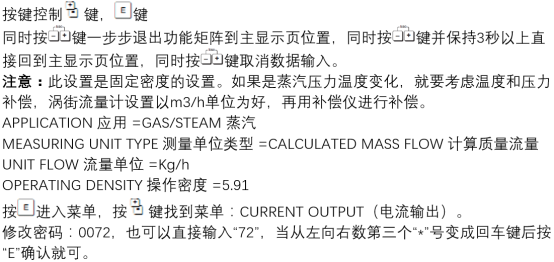
Enter the parameter setting interface through the operation keys on the transmitter or the FieldCare / DeviceCare commissioning software.
- Connect the instrument power supply and wait for self-check to complete
- Press the E key to enter the main menu
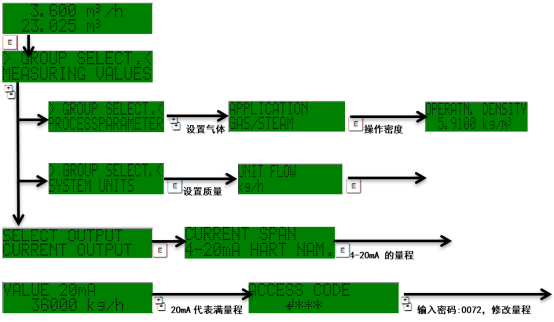
- Select Setup → Current output
Steam Range Current Output Setting Steps
Configure 4-20mA Range
In the current output menu, you need to set the flow value corresponding to 4mA and the flow value corresponding to 20mA separately.
- Enter the Current output 1 menu
- Select Assign current output and set it to Mass flow or Volume flow
- Set the flow value for Value 0% (corresponding to 4mA)
- Set the flow value for Value 100% (corresponding to 20mA)
- Confirm that Measuring mode is steam measurement mode
- Save the parameters and exit
Key Parameter Reference
The following table lists common parameter items and their descriptions in steam range setting for quick verification.
| Parameter item | Description | Typical setting |
|---|---|---|
| Assign current output | Variable corresponding to current output | Mass flow |
| Value 0% | Flow corresponding to 4mA | 0 kg/h |
| Value 100% | Flow corresponding to 20mA | Set according to process maximum |
| Measuring mode | Measurement medium mode | Steam |
| Damping | Output damping time | 1-5 s |
Precautions and Common Issues
Setting Precautions
- The upper range limit is recommended to be no less than 1.2 times the actual maximum flow to avoid signal saturation
- For steam measurement, ensure that temperature and pressure compensation parameters are correctly entered
- After modifying the range, the 4mA and 20mA output values should be recalibrated
- It is recommended to enable output damping to suppress signal fluctuations caused by steam pulsation
Common Issue Troubleshooting
- Output always at 4mA: check whether the flow is below the lower range limit or there is a sensor fault
- Output exceeds 20mA: confirm whether the upper range limit is set too low
- Large signal fluctuation: appropriately increase the damping time or check pipe vibration
Summary
The core of the steam range current output setting for the Prowirl 72 is to correctly configure the flow values corresponding to 4mA and 20mA and ensure that the measurement mode and compensation parameters match the actual operating conditions.
By following the steps in this article, the output configuration of the steam flow signal can be quickly completed, ensuring the stable operation of the metering system.