
Overview of Prowirl 72 System Unit Modification
Prowirl 72 is a commonly used vortex flowmeter in industrial sites, and its system unit settings directly affect the readability and consistency of measurement data. When process requirements change or project specifications are adjusted, it may be necessary to modify the units for parameters such as flow, temperature, and pressure. This article will guide you step by step through modifying the system units of the Prowirl 72 to ensure accurate and efficient operation.
Preparation Before Modification
Confirm Permissions and Tools
- Ensure you have instrument operation permissions (such as engineer password).
- Prepare a HART communicator, FieldCare, or local operation panel.
- Record the current unit settings for restoration purposes.
Safety Precautions
- The modification process may affect the output signal; it is recommended to perform it during non-production hours.
- If the instrument is in an explosion-proof area, please comply with relevant safety regulations.
Steps for Modifying System Units
Modification via Local Operation Panel
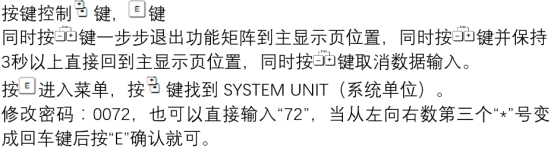
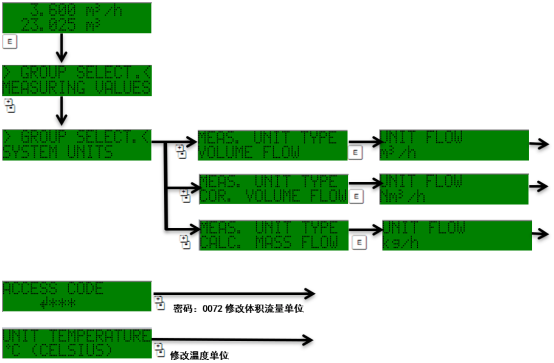
- Press the "E" key to enter the main menu.
- Use the "+" or "-" keys to select the "Setup" menu, then press "E" to confirm.
- Select the "System units" option and press "E" to enter.
- Select the desired unit category such as "Volume flow," "Temperature," or "Pressure" as needed.
- Select the target unit from the list (e.g., m³/h, L/min, etc.) and press "E" to confirm.
- Press "E" to save the settings and return to the main interface.
Modification via FieldCare Software
- Connect FieldCare to the instrument.
- Go to "Device configuration" → "System units."
- Modify the units in the corresponding parameters and click "Apply" to write them.
Common Unit Options and Corresponding Relationships
| Parameter Type | Available Units | Typical Application |
|---|---|---|
| Volume flow | m³/h, L/min, ft³/min | Gas/liquid measurement |
| Mass flow | kg/h, t/h, lb/min | Steam/gas measurement |
| Temperature | °C, °F, K | Temperature compensation |
| Pressure | bar, psi, kPa | Pressure compensation |
Verification and Precautions After Modification
Verification Methods
- Check whether the current displayed value matches the expected unit.
- Compare the data received by the host computer or DCS to ensure there is no unit conversion error.
- If the output is 4-20 mA, confirm that the range correspondence has not changed.
Precautions
- After modifying units, be sure to recheck alarm and totalizer settings to avoid false alarms caused by unit changes.
- If the instrument is used for trade settlement, modifying units must comply with relevant metrology regulations.
- It is recommended to save a configuration backup after modification for future maintenance.
By following the above steps, you can safely and accurately complete the Prowirl 72 system unit modification to ensure that measurement data meets process requirements.