
Prowirl 72 Display Damping Time Modification Guide
Prowirl 72 is a commonly used vortex flowmeter in industrial sites, and its display damping time directly affects reading stability. Properly setting the DISPLAY DAMPING parameter can effectively suppress display fluctuations. This article is intended for engineering technicians and procurement personnel and explains the specific modification method.
Why the display damping time needs to be modified
Under working conditions with large flow fluctuations, the displayed value of the Prowirl 72 may jump frequently, affecting on-site readings and records. By increasing the display damping time, the display output can be smoothed and readability improved.
Main functions
- Suppress display value jumping caused by fluid pulsation
- Improve the stability and consistency of on-site readings
- Facilitate operator recording and comparison of data
Operating steps for modifying the display damping time
The following steps apply to the on-site operation interface of the Prowirl 72. Please execute them in order.
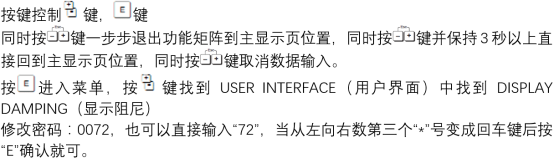
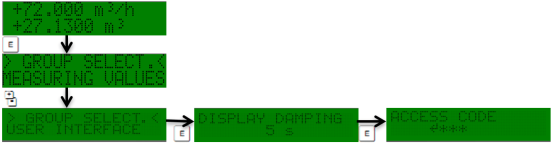
- Enter the instrument setup menu and find the DISPLAY DAMPING option.
- Enter an appropriate damping time value according to the process requirements.
- Confirm and save the parameter, then return to the main display interface.
- Observe changes in the displayed value and fine-tune the damping time if necessary.
Parameter setting reference and precautions
The damping time is not better the larger it is; it must be comprehensively weighed against the process response speed. The following table provides common reference directions.
| Working condition characteristics | Recommended damping time | Description |
|---|---|---|
| Small flow fluctuation | Smaller value | Maintain sensitive response |
| Large flow fluctuation | Larger value | Improve display stability |
| Fast response required | Smaller value | Avoid display lag |
Key tips
- After modification, observe for a period of time to confirm that the display is stable and has no obvious lag.
- Increasing the DISPLAY DAMPING time can improve stability but will reduce the display response speed.
- It is recommended to retain the parameter values in the commissioning record for subsequent maintenance.
Summary
By properly setting the display damping time of the Prowirl 72, the stability of on-site readings can be significantly improved. Engineers should strike a balance between stability and response speed according to actual working conditions. During procurement and selection, this parameter can also be considered as a commissioning point.