
Prowirl 73 Simulated Current Output Overview
Prowirl 73 is a vortex flowmeter launched by Endress+Hauser, widely used in industrial flow measurement. Its simulated current output function allows users to simulate a 4-20mA current signal without actually generating flow, for loop testing and system commissioning. For engineering technicians and procurement personnel, this function is an important tool for verifying system integration and troubleshooting.
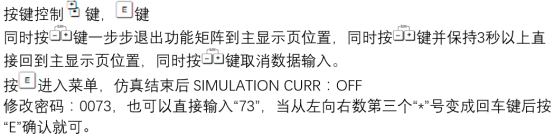
Purpose of Simulated Current Output
The simulated current output function can simulate a flow signal and output a fixed current value, used to verify the response of downstream receiving devices (such as PLC, DCS). It helps to:
- Verify the correctness of signal loop connections
- Test the linear response of the system to the current signal
- Troubleshoot on-site interference or wiring issues
- Complete commissioning without actual fluid
Operating Steps
The following steps use the local operating interface as an example to explain how to enable the simulated current output:
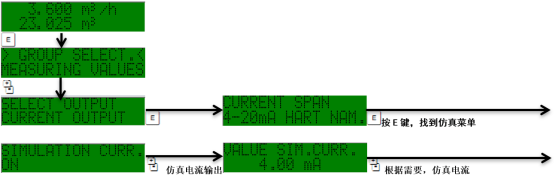
- Enter the main menu and select the "Diagnostics/Service" option.
- Find the "Simulation" submenu and select "Current Output".
- Set the simulation mode to "On".
- Enter the target current value (within the 4-20mA range).
- After confirmation, the current output will be fixed at that value.
- After testing is complete, set the simulation mode to "Off" to restore normal measurement.
Precautions and Parameters
When using the simulated current output, pay attention to the following:
| Item | Description |
|---|---|
| Current range | 4-20 mA (can be set outside the range but with caution) |
| Accuracy | ±0.05 mA |
| Impact | During simulation, the actual flow signal is ignored |
| Recovery | Normal output is automatically restored after turning off simulation |
Note: The simulated current output is only for testing. Do not enable it for a long time during normal production to avoid malfunction of the control system.
Common Problems
No response from simulated current output
- Check whether the current loop is closed
- Confirm that the simulation mode is turned on
- Check the power supply and wiring
Large deviation in current value
- Use a high-precision multimeter to measure the actual output
- Check whether the transmitter load is within the allowable range
- Perform current calibration if necessary
Through the above steps and precautions, engineering technicians can efficiently use the simulated current output function of the Prowirl 73 to improve commissioning efficiency.