
Prowirl 73 Simulation Pulse Output Overview
Prowirl 73 is a vortex flowmeter launched by Endress+Hauser, widely used for steam, gas and liquid flow measurement. Its simulation pulse output function can output pulse signals at a set frequency without connecting to an actual flow medium, and is used to verify wiring, calibrate counters and troubleshoot system faults.
This function is valuable for both engineering commissioning and procurement acceptance: commissioning personnel can quickly confirm whether the pulse loop is normal, and procurement and O&M personnel can also use it to judge whether the instrument output capability meets the requirements of the host system.
Typical Application Scenarios of Simulation Pulse Output
Commissioning and Acceptance
- Verify whether the wiring between the pulse output terminals and the PLC/DCS counter is correct
- Confirm that the pulse equivalent, frequency upper limit and host system range match
- Serve as a quick functional test method for factory or on-site acceptance
Troubleshooting
- Distinguish whether the problem is a sensor measurement issue or an output loop issue
- Troubleshoot pulse loss, counting deviation or signal interference
- Verify the entire signal chain when there is no actual flow
Simulation Pulse Output Setup Steps
The menu paths may differ slightly among firmware versions. The following is a general operation procedure, and it is recommended to execute it in conjunction with the on-site instrument manual.
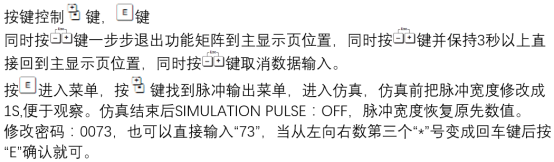
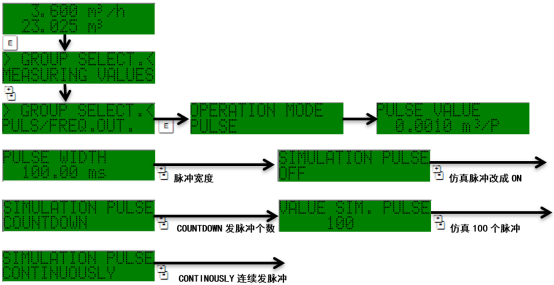
- Enter the transmitter main menu and locate the output or simulation related submenu.
- Select the simulation pulse output function item and switch it from "Off" to "On".
- Set the simulation frequency according to the host system range. The common range is 0–1000 Hz; the specific value shall be based on the instrument specifications.
- Confirm the pulse equivalent and pulse width parameters to ensure the counter can recognize them correctly.
- Save the settings and exit, and observe whether the host system count changes with the simulation frequency.
- After the test is completed, be sure to restore the simulation function to Off to avoid affecting normal measurement.
Key Parameters and Precautions
Common Parameter Reference
| Parameter | Description | Typical Range |
|---|---|---|
| Simulation frequency | Output pulse frequency setpoint | 0–1000 Hz |
| Pulse equivalent | Volume or mass represented by each pulse | Set according to range |
| Pulse width | Duration of the pulse high level | According to counter requirements |
| Output type | Active/passive, open collector, etc. | According to wiring method |
Precautions
- During simulation, the instrument does not reflect actual flow. It is only used for testing and must strictly not be turned on during normal metering.
- The simulation frequency must not exceed the maximum pulse frequency allowed by the host system and the instrument.
- After the test, be sure to turn off simulation and check whether the output under actual flow is restored.
- If counting is abnormal, first check the pulse width, wiring polarity and shielding grounding.
FAQ
Simulation is normal but there is no pulse under actual flow?
This indicates that the output loop is basically normal, and the problem is mostly in sensor measurement or medium working conditions. It is recommended to check whether the pipe is full, whether the flow velocity is lower than the minimum measurable flow, and whether the parameter settings are consistent with the actual medium.
Is the host system count too large or too small?
This is usually related to a mismatch in the pulse equivalent setting. Please check the instrument pulse equivalent and the calibration coefficient on the PLC/DCS side to ensure they are consistent.
Summary
Prowirl 73 simulation pulse output is an efficient tool for commissioning, acceptance and troubleshooting. Mastering its setup steps and key parameters can significantly shorten on-site commissioning time and improve the reliability of the pulse signal chain. After use, be sure to turn off the simulation function to ensure the metering data is authentic and reliable.