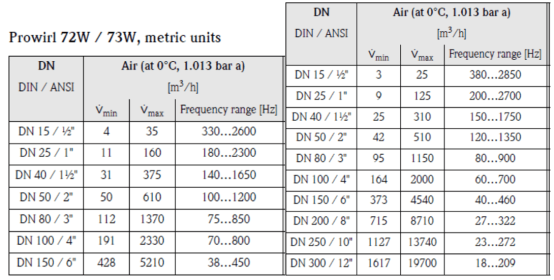
Overview of Prowirl 73 Current Output Liquid (Water) Range Setting
Prowirl 73 is a vortex flowmeter launched by Endress+Hauser, widely used for flow measurement of liquids, gases, and steam. In liquid (water) measurement scenarios, correctly setting the 4-20mA current output range is a key step to ensure accurate signal transmission.
The range setting directly determines the correspondence between the flow signal received by the host computer and the actual flow. Incorrect settings can cause display value deviations or even control system malfunction. This article is intended for engineering and technical personnel and procurement personnel, explaining the setting process step by step.
Preparation Before Setting
Confirm Process Parameters
Before entering the menu operation, it is necessary to clarify the on-site process conditions to avoid mismatch between the range and the actual flow range.
- Maximum flow: The upper limit flow value under liquid (water) process conditions, corresponding to 20mA output.
- Minimum flow: Usually 0, corresponding to 4mA output.
- Pipe diameter and medium temperature: Affect the sensor coefficient and range conversion.
- Output mode: Confirm whether the current output is active or passive mode.
Enter the Operation Interface
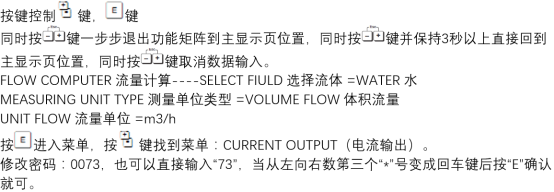
Prowirl 73 supports both on-site display operation and commissioning software operation. On-site operation enters the function matrix through panel keys, while software operation is connected via FieldCare or Simatic PDM.
Current Output Range Setting Steps
Operating Procedure
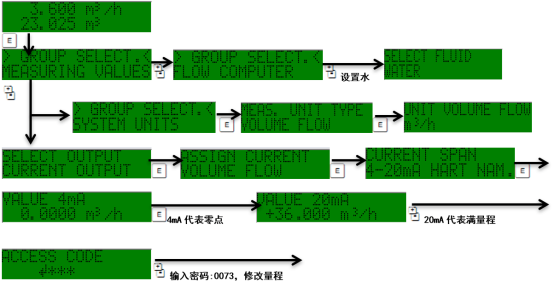
- Enter the function matrix and select the "Output" or "Current Output" menu group.
- Find the "Range" parameter and confirm whether the current range value is consistent with the actual process conditions.
- Enter the full-scale flow value corresponding to 20mA; the unit must be consistent with the on-site setting (e.g., m³/h, L/min).
- Set the zero flow value corresponding to 4mA; for liquid measurement, it is usually set to 0.
- Save the parameters and exit the menu. If necessary, perform a current output verification.
Key Parameter Reference
| Parameter | Description | Typical Setting |
|---|---|---|
| Output type | Current output mode | 4-20mA |
| 4mA corresponding value | Zero flow | 0 m³/h |
| 20mA corresponding value | Full-scale flow | Set according to process conditions |
| Damping time | Output response speed | 1-5 s |
Post-Setting Verification and Precautions
Verification Methods
- Use a multimeter to measure the current output terminal and confirm that the zero point is 4mA and the full scale is 20mA.
- Compare the on-site display value with the host computer reading; the deviation should be within the allowable error range.
- Check whether there is output jumping caused by the low flow cut-off setting.
Common Problems
If the output current does not match the flow, first check whether the range units are consistent, whether the sensor coefficient is correct, and whether there is an alarm status. After parameter modification, it is recommended to record and file for future maintenance and fault tracing.