
Overview of TMT85 Temperature Transmitter Address Setting
The TMT85 temperature transmitter supports both HART and Profibus PA communication protocols. Address setting is a key step in network commissioning. A correct address ensures normal communication between the transmitter and the control system. This article introduces the address setting methods for the TMT85, covering hardware DIP switches and software configuration.
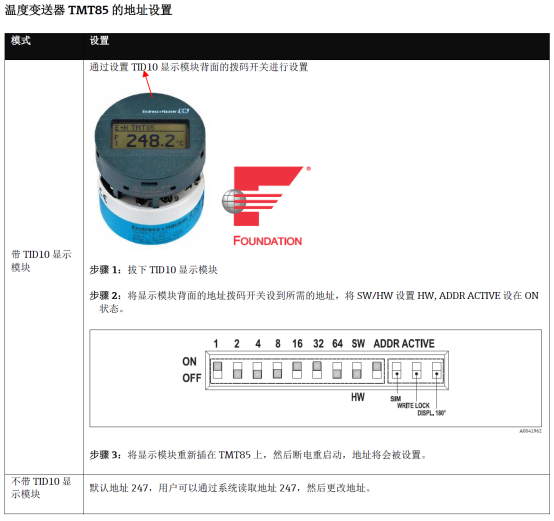
Comparison of Address Setting Methods
The TMT85 offers two address setting methods, which users can choose based on the protocol and site conditions.
| Setting Method | Applicable Protocol | Operation Location | Advantages | Disadvantages |
|---|---|---|---|---|
| Hardware DIP Switch | Profibus PA | DIP switch in transmitter electronics compartment | No tools required, direct setting | Requires opening the housing, limited address range |
| Software Configuration | HART/Profibus PA | Via handheld communicator or configuration software | Large address range, remote setting possible | Requires normal communication, depends on tools |
Profibus PA Address Setting Steps
Hardware DIP Switch Setting
Under the Profibus PA protocol, the hardware DIP switch can set addresses from 1 to 126. The DIP switch is located inside the transmitter electronics compartment and requires opening the housing for operation.
- Disconnect the transmitter power supply to ensure safety.
- Open the transmitter housing and locate the DIP switch (usually 8-position).
- Set the DIP switches in binary according to the required address (positions 1-7 are address bits, position 8 is the address valid bit).
- For example, for address 5: set DIP switches 1 and 3 to ON, the rest to OFF, and position 8 to ON.
- Close the housing, power on again, and the address takes effect.
Software Configuration Address
If hardware DIP switch position 8 is set to OFF, the address is determined by software. Set it via the Profibus PA configuration tool or handheld communicator.
- Connect the transmitter to the Profibus PA network.
- Scan for devices in the configuration software and find the TMT85.
- Enter the device parameters and set the device address (1-126).
- Download the parameters, and the address takes effect immediately.
HART Address Setting
Under the HART protocol, the TMT85 supports polling address setting for multi-drop communication. Typically, the address for single-point applications is 0.
- Connect the transmitter via a handheld communicator or configuration software.
- Enter the HART address menu.
- Set the address (0-63); 0 is single-point mode, 1-63 is multi-drop mode.
- After confirmation, the transmitter communicates with the new address.
Precautions
- The address must be unique to avoid conflicts.
- The Profibus PA address range is 1-126; 0 is usually reserved.
- Hardware DIP switch settings take priority over software settings (when position 8 is ON).
- After changing the address, power cycle or restart communication.
- It is recommended to record address assignments for easy maintenance.
Frequently Asked Questions
- Address cannot be set: Check whether DIP switch position 8 is ON, or whether communication is normal.
- Communication failure: Confirm the address is unique and the bus terminator resistors are correct.
- Address lost: Check the battery or power supply, and reset if necessary.