
FMU4X Ultrasonic Level Meter Basic Setup Overview
The FMU4X series is a commonly used ultrasonic level meter in industrial sites, widely applied in water treatment, chemical storage tanks, and process control applications. Its basic setup directly determines measurement accuracy and operational stability.
Based on the FMU30/FMU4x concise operating guide, this article outlines the core steps of instrument initialization and parameter configuration for reference by engineering technicians and procurement personnel.
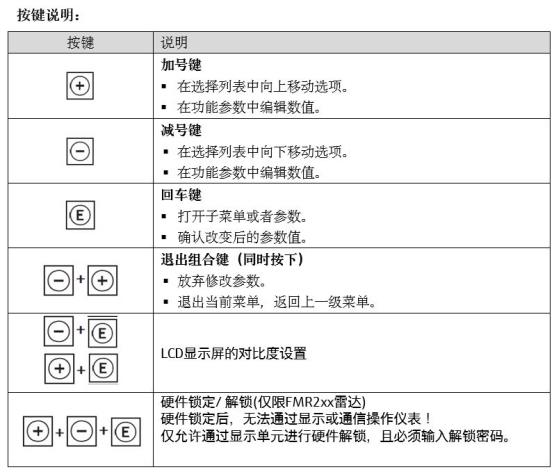
Preparation Before FMU4X Basic Setup
On-site Condition Confirmation
- Confirm that the installation location is away from the feed inlet and agitator to avoid false echo interference.
- Check the distance between the probe and the medium surface to ensure it is outside the dead zone.
- Verify the supply voltage and output signal type to match the control system.
Tools and Documentation Preparation
- Prepare the operation manual and parameter list.
- Have a handheld communicator or commissioning software ready for on-site parameter modification.
FMU4X Basic Setup Operation Steps
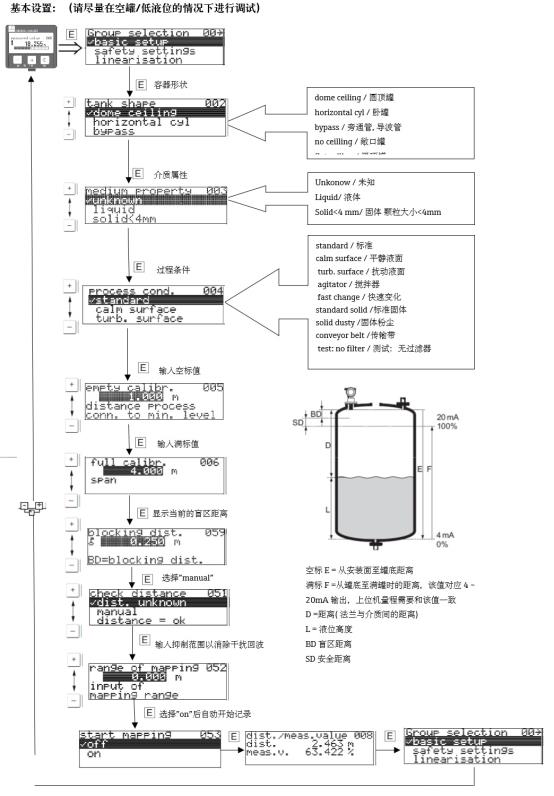
The setup logic of FMU30 and FMU4x is basically the same, and can be performed according to the following process.
- After power-on, wait for the instrument self-check to complete and enter the main menu.
- Select the basic setup option to enter the parameter configuration interface.
- Enter the empty tank height and full scale, corresponding to the 4mA and 20mA output points.
- Set the medium and process conditions, such as dielectric constant, agitation status, etc.
- Save the parameters and return to the measurement interface to observe whether the echo curve is stable.
FMU4X Key Parameter Description and Comparison
| Parameter Item | Function | Setting Recommendation |
|---|---|---|
| Empty tank height | Defines the measurement zero point | Enter according to actual tank dimensions |
| Full scale | Defines the level corresponding to 20mA | Reserve 10% safety margin |
| Dead zone | Avoids near-distance false echoes | Keep the level above the dead zone |
| Output damping | Suppresses signal fluctuation | Set according to process response speed |
FMU4X Basic Setup Precautions
- After modifying parameters, be sure to save and reset, otherwise the settings will not take effect.
- When strong agitation or foam exists on site, it is recommended to enable the echo suppression function.
- Regularly check the probe for scaling to avoid affecting the ultrasonic echo strength.
After completing the basic setup, it is recommended to continuously observe multiple measurement cycles and confirm stable output before putting it into formal operation.