
PMX5x/FMX5x Flow Mode Setting Steps
The PMX5x and FMX5x series instruments are widely used in flow measurement. Correctly setting the flow mode is key to ensuring measurement accuracy. The following steps will guide you through the setup.
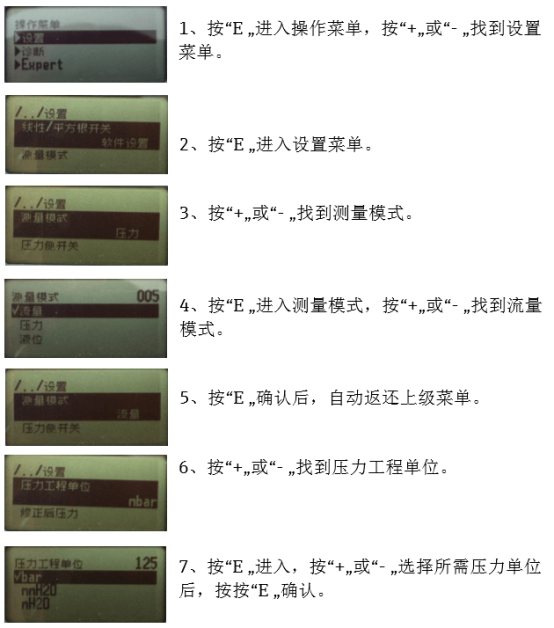
1. Enter the Setup Menu
- Press the "E" key to enter the operation menu.
- Press the "+" or "-" key to find the Setup Menu.
- Press the "E" key to enter the setup menu.
- Press the "+" or "-" key to find the Measurement Mode.
- Press the "E" key to enter the measurement mode, then press the "+" or "-" key to find the Flow Mode.
- Press the "E" key to confirm, and it will automatically return to the previous menu.
2. Set Pressure Engineering Unit
- Press the "+" or "-" key to find the Pressure Engineering Unit.
- Press the "E" key to enter, then press the "+" or "-" key to select the desired pressure unit.
- Press the "E" key to confirm.
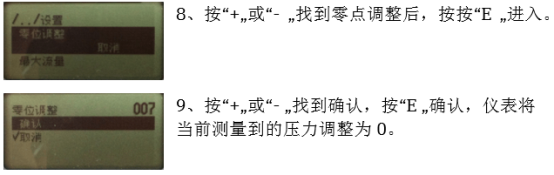
3. Zero Adjustment
- Press the "+" or "-" key to find the Zero Adjustment, then press the "E" key to enter.
- Press the "+" or "-" key to find Confirm, then press the "E" key to confirm. The instrument will adjust the currently measured pressure to 0.
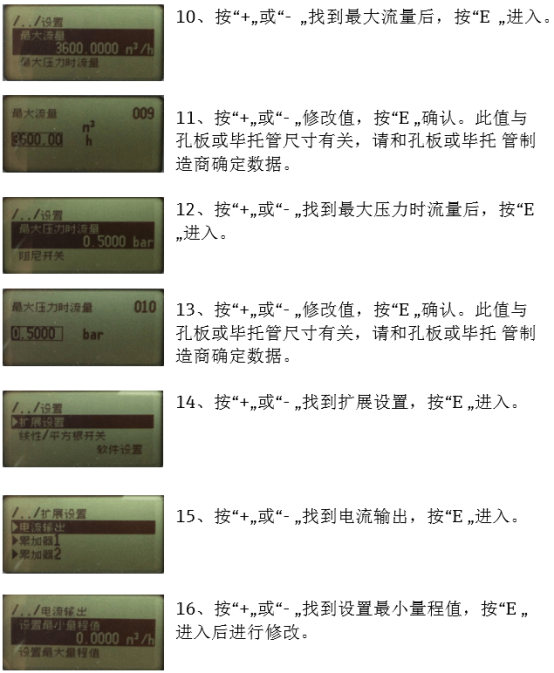
4. Set Maximum Flow and Flow at Maximum Pressure
- Press the "+" or "-" key to find the Maximum Flow, then press the "E" key to enter.
- Press the "+" or "-" key to modify the value, then press the "E" key to confirm. This value is related to the orifice plate or Pitot tube size; please confirm the data with the orifice plate or Pitot tube manufacturer.
- Press the "+" or "-" key to find the Flow at Maximum Pressure, then press the "E" key to enter.
- Press the "+" or "-" key to modify the value, then press the "E" key to confirm. Also confirm the data with the manufacturer.
5. Extended Setup and Current Output
- Press the "+" or "-" key to find the Extended Setup, then press the "E" key to enter.
- Press the "+" or "-" key to find the Current Output, then press the "E" key to enter.
- Press the "+" or "-" key to find Set Minimum Range Value, then press the "E" key to enter.
- Press the "+" or "-" key to find Set Maximum Range Value, then press the "E" key to enter.
- Press the "+" or "-" key to modify the range value, then press the "E" key to confirm.
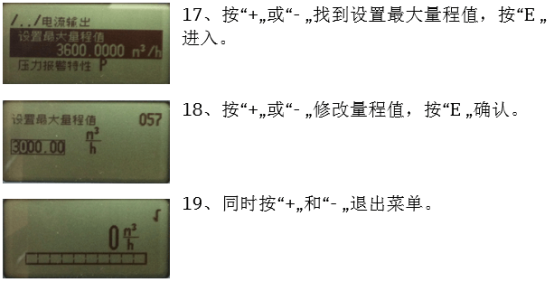
6. Exit the Menu
Press the "+" and "-" keys simultaneously to exit the menu.
Parameter Setting Reference Table
| Parameter | Description |
|---|---|
| Pressure Engineering Unit | Select according to requirements, e.g., MPa, kPa, etc. |
| Maximum Flow | Related to the orifice plate or Pitot tube size; requires manufacturer confirmation. |
| Flow at Maximum Pressure | Related to the orifice plate or Pitot tube size; requires manufacturer confirmation. |
| Minimum Range Value | Lower limit of current output |
| Maximum Range Value | Upper limit of current output |
Note: During the setting process, ensure that the parameters are consistent with the data provided by the orifice plate or Pitot tube manufacturer to ensure measurement accuracy.