
PMX5x/FMX5x Analog Current Output Operation Guide
The PMX5x and FMX5x series instruments support analog current output function, which can be used for testing or calibration. This article provides detailed steps based on actual key operations. Before operation, please ensure the instrument is in normal working condition.
Operation Steps
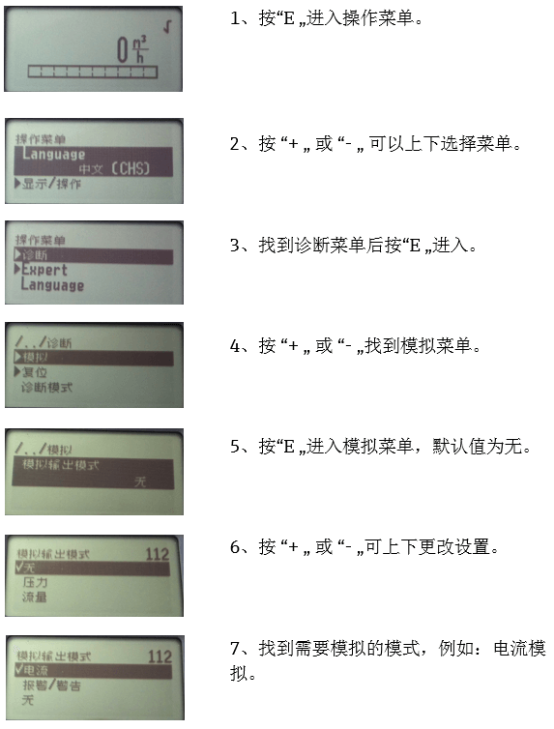
- Press the "E" key to enter the operation menu.
- Press the "+" or "-" key to scroll up and down the menu.
- Find the Diagnostic Menu and press the "E" key to enter.
- Press the "+" or "-" key to find the Simulation Menu.
- Press the "E" key to enter the simulation menu; the default value is None.
- Press the "+" or "-" key to change the setting up or down.
- Find the mode to be simulated, for example, Current Simulation.
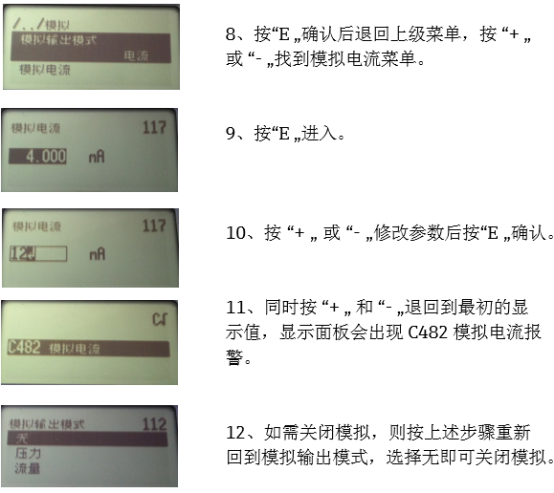
- Press the "E" key to confirm, then return to the upper menu, and press the "+" or "-" key to find the Analog Current Menu.
- Press the "E" key to enter.
- Press the "+" or "-" key to modify the parameter, then press the "E" key to confirm.
- Press the "+" and "-" keys simultaneously to return to the initial display value; the display panel will show C482 Analog Current Alarm.
- To turn off the simulation, follow the above steps to return to the analog output mode and select None to turn off the simulation.
Precautions
- Do not power off during operation to avoid losing settings.
- Analog current output is only for testing; please turn it off promptly after completion.
- If an alarm occurs, please follow the steps to turn off the simulation or contact technical support.