
PMX5x/FMX5x Pressure Mode Setting Overview
Before putting the PMX5x and FMX5x series pressure instruments into operation, the relevant parameters of the pressure mode need to be set. Correct settings ensure measurement accuracy and consistency of the output signal.
This article will introduce step by step, following the operation menu sequence, the setting methods for pressure engineering unit, zero adjustment, and minimum/maximum range value.
Pressure Mode Setting Operation Steps
Step 1: Enter the Settings Menu
- In the operation menu, press the "+" or "-" key to find the "Settings" menu.
- Press the "E" key to enter the settings menu.
Step 2: Select Pressure Engineering Unit
- Press the "+" key to find the "Pressure Engineering Unit" menu, and press the "E" key to enter.
- Press the "+" or "-" key to select the desired pressure unit.
- Press the "E" key to confirm and return to the previous menu.
Step 3: Perform Zero Adjustment
- Press the "-" key to find the "Zero Adjustment" menu, and press the "E" key to enter.
- After selecting "Confirm", press the "E" key. The instrument will take the current measured value as the position zero point and return to the previous menu.
Step 4: Set the Minimum Range Value
- Press the "+" key to find the "Set Minimum Range Value" menu, and press the "E" key to enter.
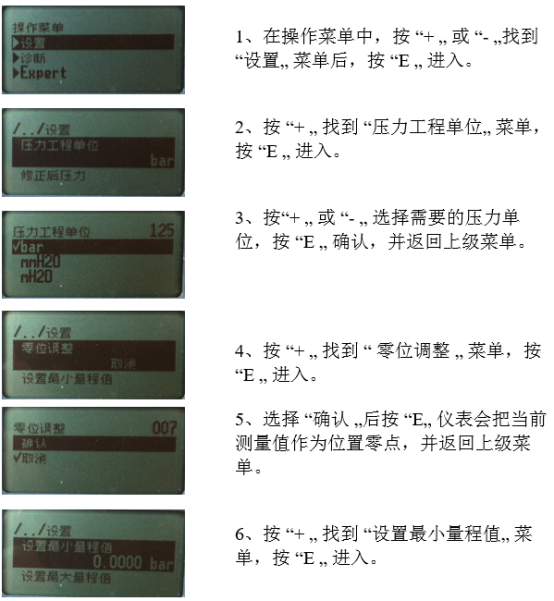
- Press the "+" or "-" key to modify the minimum range value.
- Press the "E" key to confirm and return to the previous menu.
Step 5: Set the Maximum Range Value
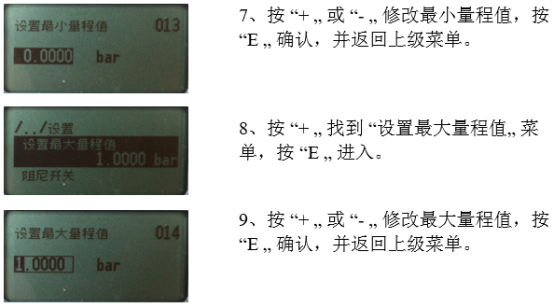
- Press the "+" key to find the "Set Maximum Range Value" menu, and press the "E" key to enter.
- Press the "+" or "-" key to modify the maximum range value.
- Press the "E" key to confirm and return to the previous menu.
Key Parameters and Operation Points
| Setting Item | Menu Name | Operation Keys | Function |
|---|---|---|---|
| Pressure Unit | Pressure Engineering Unit | + / - / E | Select the pressure unit for display and output |
| Zero Adjustment | Zero Adjustment | - / E | Set the current measured value as the position zero point |
| Minimum Range | Set Minimum Range Value | + / - / E | Set the lower limit value of the range |
| Maximum Range | Set Maximum Range Value | + / - / E | Set the upper limit value of the range |
Precautions
- Before setting, please confirm that the instrument is properly installed and powered on.
- Zero adjustment should be performed under actual zero pressure conditions to avoid introducing measurement errors.
- When modifying the minimum/maximum range value, ensure that the minimum range is less than the maximum range.
- After each modification, press the "E" key to confirm; otherwise, the parameters will not be saved.