
Prosonic 93 Simulation Pulse Output Overview
Prosonic 93 is an ultrasonic level measurement instrument launched by Endress+Hauser, widely used for continuous measurement of liquid and solid levels. Its simulation pulse output function allows the instrument to simulate an output pulse signal without changing the actual level, to verify whether the response of downstream receiving devices (such as PLCs, counters, or displays) is correct.
This function is very practical in loop testing, system integration, and troubleshooting, helping engineering and technical personnel quickly confirm the integrity of the signal chain without actually filling or emptying the vessel.
Purpose and Applicable Scenarios of Simulation Pulse Output
Main Purposes
- Loop test: Verify whether the entire signal path from Prosonic 93 to the control system is normal.
- System commissioning: Before formal operation, simulate pulse outputs corresponding to different levels and check the host computer display and alarm logic.
- Troubleshooting: When the actual measured value is abnormal, determine through simulation output whether the problem is with the instrument or downstream devices.
Typical Applicable Scenarios
- Pre-commissioning inspection of instruments for new or retrofit projects.
- Functional verification during regular maintenance.
- Interlock testing related to safety instrumented systems (SIS).
Prosonic 93 Simulation Pulse Output Setup Steps
The following steps are based on a common operation interface. The specific menu path may vary slightly depending on the firmware version. Please refer to the actual instrument menu.
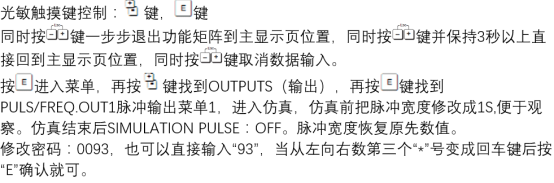
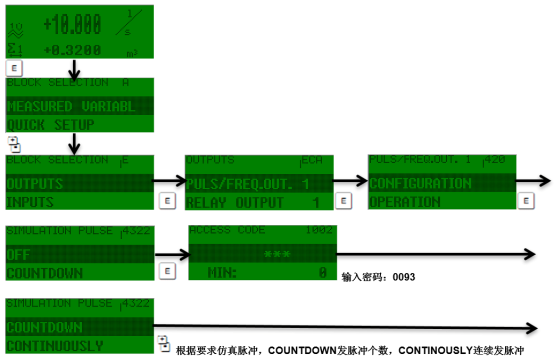
- Enter the instrument main menu and select the "Diagnostics/Simulation" or "Service" submenu.
- Find the Simulation function and select "Pulse output" or "Simulation pulse output".
- Set the simulation value: Enter the desired pulse frequency or pulse quantity (depending on the output type).
- Confirm that the simulation mode is "On". At this time, the instrument output will switch to the simulation signal.
- Observe on the downstream device whether the signal is received and displayed normally.
- After the test is completed, be sure to turn off the simulation mode and restore the actual measurement output.
Key Parameters and Precautions
Common Parameter Descriptions
| Parameter | Description | Typical Value/Options |
|---|---|---|
| Simulation mode | Turn the simulation function on or off | On / Off |
| Pulse output type | Select the physical form of the pulse output | Frequency output / Pulse output |
| Simulation value | Corresponding value of the simulated level or flow | Set according to the measuring range |
| Simulation duration | Time when the simulation automatically ends | Settable or indefinite |
Precautions
- During simulation, the instrument no longer outputs the actual measured value, which may trigger an alarm on the host computer. Please notify relevant personnel in advance.
- When used for safety interlock systems, relevant safety regulations must be observed, and the interlock must be released first if necessary.
- After the test, be sure to turn off the simulation; otherwise, the instrument will continue to output the simulation signal, causing misjudgment in production.
- It is recommended to perform simulation tests during low-load or shutdown periods to reduce the impact on production.
Summary
The simulation pulse output of the Prosonic 93 is an efficient commissioning and verification tool that can test the signal chain without changing the actual level. Proper use of this function can significantly improve instrument commissioning efficiency and system reliability. During operation, please strictly follow the steps and pay attention to restoring the state after testing.