
Promag 10 Current Output Range Setting Overview
Promag 10 is an electromagnetic flowmeter launched by Endress+Hauser, and its current output range configuration directly affects signal acquisition accuracy. Correctly setting the flow range corresponding to 4-20mA is a key step to ensure accurate system measurement.
This article is intended for engineering and technical personnel and procurement personnel, providing a clear setting process and parameter comparison to help you quickly complete on-site commissioning.
Preparation Before Setting
Required Tools and Conditions
- The Promag 10 transmitter is powered on and in normal measurement status
- On-site display module or commissioning tool with operation permissions
- Confirm the flow upper and lower limit values required by the process (such as 0~100 m³/h)
Confirmation of Key Parameters
Before setting, it is necessary to clarify the full-scale flow value and the corresponding current value. Usually 4mA corresponds to the lower limit flow, and 20mA corresponds to the upper limit flow.
Current Output Range Setting Steps
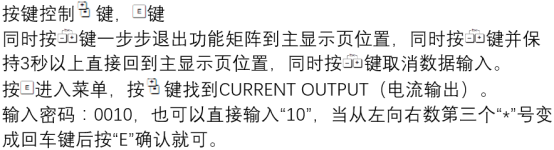
Step 1: Enter the Parameter Menu
- Press the "E" key through the on-site display module to enter the main menu.
- Select "Setup" → "Current output".
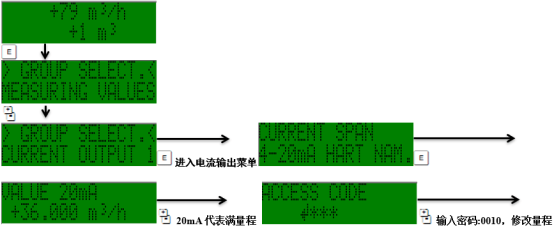
Step 2: Configure Range Parameters
- Set "Current span" to 4-20mA (or select another range according to system requirements).
- Enter the flow value corresponding to "Value 0%" (that is, the 4mA point).
- Enter the flow value corresponding to "Value 100%" (that is, the 20mA point).
- Confirm the "Failsafe mode" setting, usually select "Minimum" or "Maximum".
Step 3: Save and Verify
- Press the "E" key to save the settings.
- Return to the measurement interface and check whether the current output corresponds to the flow.
- If necessary, use a multimeter in series to measure the actual current value.
Range Setting Parameter Comparison Table
| Parameter Item | Description | Typical Setting |
|---|---|---|
| Current span | Current output range | 4-20 mA |
| Value 0% | Flow corresponding to 4mA | 0 m³/h |
| Value 100% | Flow corresponding to 20mA | 100 m³/h |
| Failsafe mode | Output status in case of failure | Minimum (3.6 mA) |
Precautions and Common Problems
Key Precautions
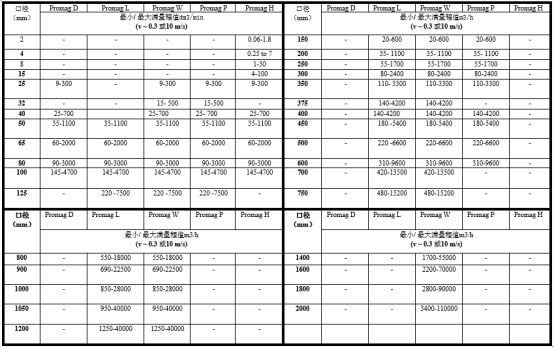
- Ensure that the full-scale flow does not exceed the maximum flow allowed by the sensor.
- The flow values corresponding to 4mA and 20mA should cover the actual process range to avoid signal truncation.
- After modifying the range, the scaling parameters of the host computer or PLC need to be updated synchronously.
Common Problems
- No change in current output: Check whether the wiring is correct and confirm that the transmitter is not in failure mode.
- Large current value deviation: Recalibrate the 4mA and 20mA points, or check whether the power supply voltage is stable.
Summary
Correctly setting the Promag 10 current output range is the basis for ensuring accurate flow measurement. Operate according to the above steps, and pay attention to parameter matching and verification, which can effectively improve system reliability.
For more detailed parameter descriptions, please refer to the official Endress+Hauser technical manual or contact technical support.