
Promag 50 Simulation Pulse Output Overview
Promag 50 electromagnetic flowmeter supports the simulation pulse output function, which is used to simulate flow signals to verify system connections and parameter configurations. This function is very practical in debugging and troubleshooting, and can help engineering and technical personnel quickly confirm whether the pulse output loop is normal.
Through simulation pulse output, users can manually trigger pulse signals without actual flow and check whether the counting of the host computer or PLC is accurate. The following content will introduce its setup steps and precautions in detail.
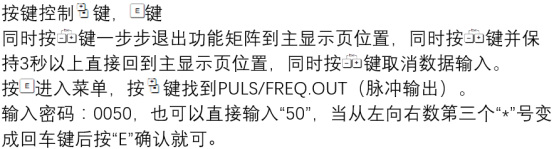
Simulation Pulse Output Setup Steps
Enter Simulation Mode
First, ensure that the flowmeter is in service mode or expert mode, and then enter the "Simulation" menu through the operation panel. The specific path may vary slightly depending on the firmware version; please refer to the corresponding manual.
- Press the E key to enter the main menu.
- Use the + or - key to select the "Simulation" option.
- Press the E key to confirm and enter the simulation submenu.
Configure Pulse Output Parameters
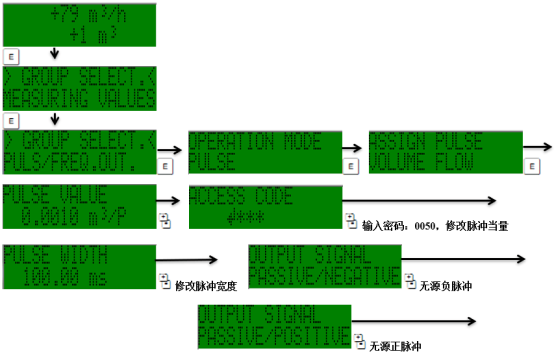
In the simulation submenu, select "Pulse Output" and set the relevant parameters. Usually, it is necessary to specify the pulse equivalent and output frequency to match the actual application scenario.
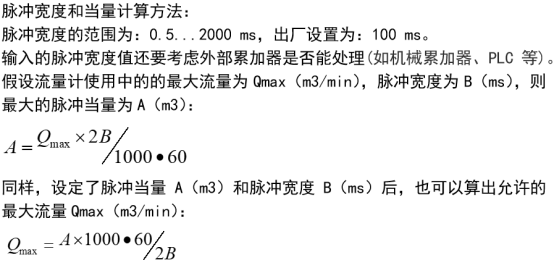
- Pulse equivalent: the volume or mass represented by each pulse, for example, 1 pulse = 0.1L.
- Output frequency: the frequency of the simulation pulse, which must be within the allowable range of the flowmeter.
- Simulation value: the manually entered flow value, used to calculate the output frequency.
After the settings are completed, start the simulation, and the flowmeter will output pulse signals according to the set value.
Parameter Description and Precautions
Key Parameters
| Parameter | Description | Typical Value |
|---|---|---|
| Pulse equivalent | Flow volume corresponding to each pulse | 0.1L/P |
| Maximum frequency | Maximum frequency of pulse output | 10kHz |
| Simulation flow | Manually entered simulated flow value | Set according to range |
Precautions
- Simulation pulse output is only for testing and must not be used for trade settlement.
- Ensure that the output loop wiring is correct to avoid short circuits or overload.
- After the simulation is completed, exit simulation mode in time and restore actual measurement.
- If the pulse output is abnormal, check the pulse equivalent and frequency upper limit settings.
Summary
The simulation pulse output function of the Promag 50 provides engineering and technical personnel with a convenient debugging method. By setting parameters correctly, the integrity and accuracy of the pulse output loop can be quickly verified. During actual operation, safety regulations must be followed to ensure stable operation of the equipment.