
Detailed Explanation of Promag 50 Electromagnetic Flowmeter Empty Pipe Detection Function
In industrial flow measurement, electromagnetic flowmeters may experience display fluctuation and non-zero readings at zero flow due to gas entrainment or partially filled pipes, and may even show abnormally high values. The empty pipe detection function provided by the Promag 50 can effectively identify such conditions and ensure measurement stability.
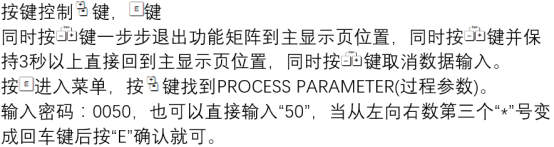
Empty Pipe Detection Modes and Setup
The Promag 50 supports two empty pipe detection modes: EPD (Empty Pipe Detection) and OED (Optimized Empty Pipe Detection). Depending on application requirements, the following settings can be selected via parameters:
- OFF: Both EPD and OED are inactive.
- ON SPECIAL: Only applicable to specific nominal diameters (DN).
- OED- ON STANDARD: OED is activated in standard mode.
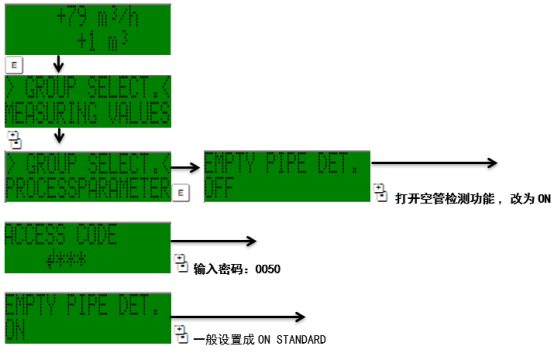
Setup Steps
- Enter the instrument parameter setup menu and locate the empty pipe detection option.
- Select the appropriate mode (OFF, ON SPECIAL, or OED- ON STANDARD) based on the pipe diameter and application scenario.
- Save the settings and exit, then observe whether the flow display is stable.
Mode Comparison and Selection Recommendations
The applicable scenarios and characteristics of different modes are shown in the table below:
| Mode | Description | Applicable Scenario |
|---|---|---|
| OFF | Both EPD and OED are disabled | Full pipe with no gas conditions |
| ON SPECIAL | Activated only for specific nominal diameters | Small diameter or special applications |
| OED- ON STANDARD | OED activated in standard mode | Conditions prone to gas entrainment or partially filled pipes |
It is recommended to select the OED- ON STANDARD mode in conditions prone to empty pipes or gas entrainment to improve measurement reliability.