
Overview of Promass 83 Pulse Output Setup
Promass 83 is a Coriolis mass flowmeter launched by Endress+Hauser and is widely used in industrial flow measurement. Its pulse output function can convert flow signals into frequency signals for acquisition by devices such as PLCs and counters. Correctly setting the pulse output is key to ensuring measurement accuracy. This article introduces the setup method step by step.
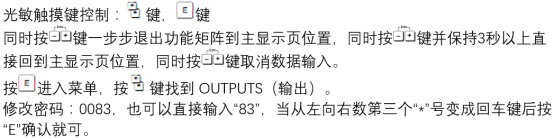
Preparation Before Setup
Before starting configuration, please confirm that the following conditions are met to avoid operation interruption or equipment damage.
- The flowmeter has been correctly installed and powered on, and is in measurement mode.
- Operating permission has been obtained (if a password is required, please prepare it).
- Confirm that the pulse output terminals have been connected to the target device (such as a PLC counter).
- Understand the required pulse equivalent (the flow value represented by each pulse).
Pulse Output Parameter Configuration Steps
Enter the menu through the local display or commissioning software, and set the pulse output according to the following steps.
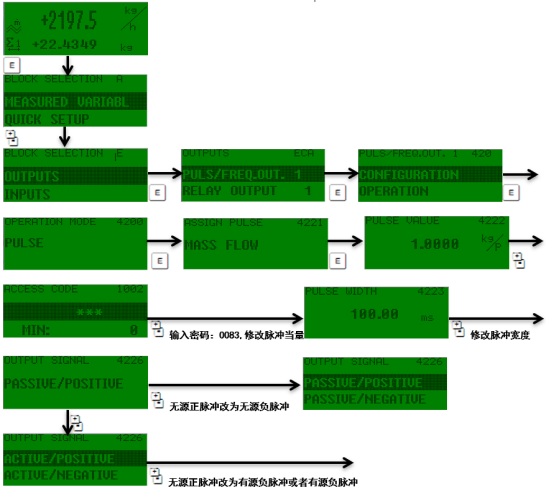
1. Enter the Output Setup Menu
- Press the E key to enter the main menu.
- Use the +/- keys to select the "Setup" or "Output" option.
- Press the E key to confirm and enter the output configuration interface.
2. Select the Pulse Output Type
In the output configuration, select "Pulse" as the output type. Some models require specifying the output channel (such as channel 1 or 2).
3. Set the Pulse Equivalent
The pulse equivalent determines the flow value represented by each pulse (such as 0.1 kg or 1 L). Enter the value according to the requirements of the downstream device. It is recommended to use the pulse equivalent together with the pulse width to ensure that the signal can be correctly recognized.
4. Configure the Pulse Width
The pulse width refers to the duration of the pulse, usually selectable from 0.1 ms to 1000 ms. It must match the response frequency of the acquisition device. If the frequency is too high, increase the pulse width or adjust the pulse equivalent.
5. Save and Exit
Press the E key to save the settings and return to the measurement interface. It is recommended to perform a simulation test to verify whether the pulse output is normal.
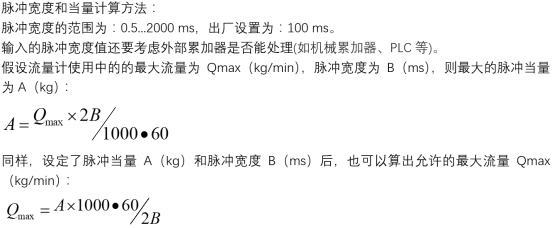
Description of Key Parameters and Recommended Values
The following table lists the meanings and typical settings of parameters related to pulse output for engineering reference.
| Parameter | Description | Typical Value/Range |
|---|---|---|
| Pulse equivalent | Flow value corresponding to each pulse | 0.001~1000 kg or L |
| Pulse width | Pulse duration | 0.1~1000 ms |
| Output frequency | Maximum pulse frequency | ≤10 kHz (depending on model) |
| Output mode | Pulse polarity (positive/negative) | Positive logic (default) |
Common Problems and Troubleshooting
If the pulse output is abnormal, refer to the following troubleshooting steps.
- No pulse output: Check whether the wiring is correct, whether the output is enabled, and whether the pulse equivalent is too large.
- Pulse frequency does not match: Verify the pulse equivalent and flow range, and adjust the pulse width.
- Signal interference: Use shielded cables and ensure good grounding.
Summary
Correctly setting the pulse output of the Promass 83 can ensure stable transmission of flow signals. Key points include: selecting an appropriate pulse equivalent, matching the pulse width, and performing actual tests. By following the steps in this article, configuration can be completed quickly.