
Overview of T-mass 65 Flowmeter System Unit Modification
T-mass 65 is a thermal mass flowmeter introduced by Endress+Hauser, widely used for gas flow measurement. In actual engineering, it is often necessary to modify the system units for instantaneous flow and totalized flow according to process requirements.
Based on field operation experience, this article introduces the specific steps to modify units through the local display unit, suitable for reference by engineering technicians and procurement personnel.
Pre-operation Preparation and Precautions
Prerequisites
- Ensure the flowmeter is in measuring mode or can enter setup mode.
- Obtain operating authorization (if a password is required, prepare the password for the corresponding level).
- Record the current unit settings for restoration or comparison.
Safety Tips
- Modifying units may affect the numerical display of totalized flow; it is recommended to operate during non-critical production periods.
- If the flowmeter is connected to a control system, the host computer unit settings must be updated synchronously after modification.
Steps to Modify Instantaneous Flow Units
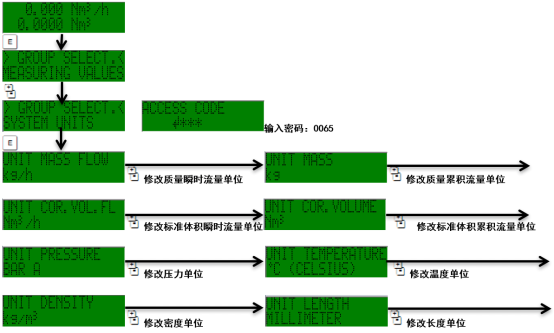
Instantaneous flow units are typically kg/h, Nm³/h, etc. The modification steps are as follows:
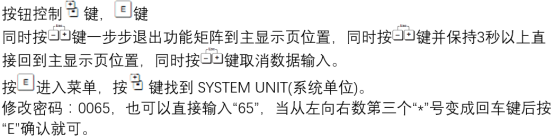
- Press the E key to enter the main menu.
- Use the + or - key to select Setup.
- Press the E key to enter, and select System units.
- Select Mass flow unit or Corrected volume flow unit.
- After pressing the E key, use the + or - key to select the target unit.
- Press the E key to confirm, and press the Esc key to return to measuring mode.
Steps to Modify Totalized Flow Units
Totalized flow units are typically kg, Nm³, etc. The modification path is similar to that for instantaneous flow:
- Enter Setup → System units.
- Select Totalizer unit.
- After pressing the E key, use the + or - key to select the target unit.
- Press the E key to confirm, and press the Esc key to return.
Note: After modifying the totalized flow unit, the totalized value will not be automatically converted; only the display unit changes. If you need to retain the original totalized value, please record or reset it first.
Common Unit Comparison and Selection Recommendations
| Measurement Type | Common Units | Applicable Scenarios |
|---|---|---|
| Instantaneous mass flow | kg/h, kg/min, kg/s | General gas mass flow measurement |
| Instantaneous corrected volume flow | Nm³/h, Nl/min | Trade settlement or process control requiring corrected volume |
| Totalized mass flow | kg, t | Batch metering or energy consumption statistics |
| Totalized corrected volume flow | Nm³, Nl | Gas volume total metering |
Common Problems and Troubleshooting
Units Cannot Be Modified
- Check whether it is in write protection status; the correct password must be entered.
- Confirm that the hardware lock is not enabled.
Abnormal Display After Modification
- Confirm that the range matches the unit; reset the range if necessary.
- Check whether the sensor coefficient has been accidentally changed.
If the problem persists, it is recommended to restore factory settings or contact the manufacturer's technical support.
Summary
Through the above steps, the system units for instantaneous flow and totalized flow on the T-mass 65 can be quickly modified. Pay attention to authorization and range matching during operation to ensure accurate and reliable measurement data.