
T-mass 65 User Interface Setup Overview
T-mass 65 is a thermal mass flowmeter used for gas flow measurement. Its user interface handles core functions such as parameter viewing, configuration modification, and on-site commissioning. Mastering the interface setup logic can significantly shorten commissioning time and reduce operating errors.
This article focuses on the display module, key operations, and menu structure, and is suitable for engineering technicians and procurement selection reference.
Interface Composition and Key Functions
Display and Operating Unit
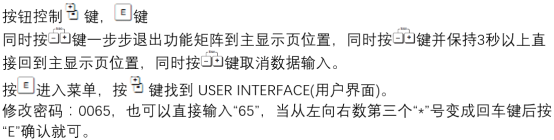
The T-mass 65 field interface usually consists of a liquid crystal display and optical/mechanical keys, supporting direct operation outside hazardous areas.
- Display area: shows instantaneous flow, totalizer, units, and status information.
- Operating keys: generally include "+/-" and "E" keys, used for page turning, value modification, and confirmation.
- Status indication: prompts alarms, faults, and maintenance requirements via symbols or codes.
Typical Key Operation Logic
- Press the "+" or "-" key to switch between function groups.
- Press the "E" key to enter the selected function group or confirm the input value.
- Press the key combination to return to the previous menu or exit editing status.
Menu Structure and Parameter Configuration
Main Function Groups
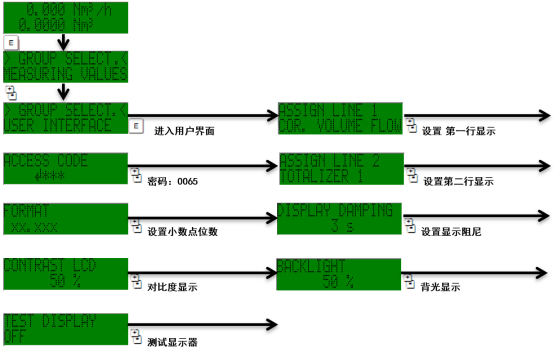
The menu is usually divided by function into groups such as measured value display, system settings, process parameters, and diagnostic information, making it easy to locate quickly.
| Function Group | Main Content | Typical Use |
|---|---|---|
| Measured Values | Flow, totalizer, units | Daily monitoring |
| System Settings | Language, display, communication | On-site configuration |
| Process Parameters | Range, medium, calibration | Commissioning |
| Diagnostics | Alarms, self-test, logs | Troubleshooting |
Recommended Setup Steps
- Confirm that the instrument is in measurement mode and record the current parameters.
- Enter system settings and select language and display units.
- Set the range and medium type according to process requirements.
- After saving, return to the measurement interface and check the displayed values.
Commissioning and Precautions
After setup is complete, perform a zero-point verification and display check to ensure the flow reading is consistent with actual working conditions.
- Before modifying key parameters, it is recommended to record the original values for easy restoration.
- Parameters involving safety interlock must be confirmed by authorized personnel.
- If an alarm code appears, check the diagnostic menu first before adjusting parameters.
Proper use of the T-mass 65 user interface can improve the reliability and maintenance efficiency of gas flow measurement.