
Prowirl 72 Startup Display and Key Operation Instructions
Prowirl 72 is a vortex flowmeter launched by Endress+Hauser, widely used in industrial process measurement. Correctly understanding its startup display and key operations is the foundation for on-site commissioning and daily maintenance. Based on official materials, this article systematically introduces the startup display interface and key functions.
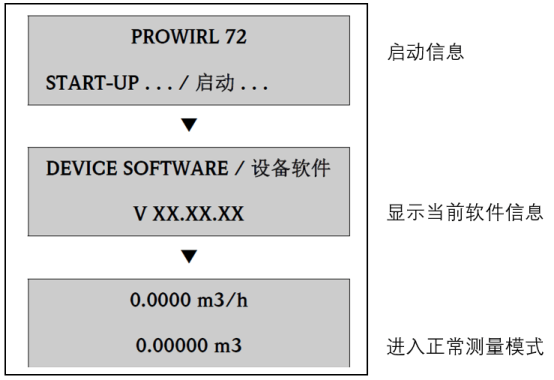
1. Startup Display Interface
After the instrument is powered on, the display will sequentially perform self-test and show key information. The startup display content depends on the instrument configuration and current status, usually including the following categories:
- Self-test information: Displays software version and hardware status. After self-test passes, it enters measurement mode.
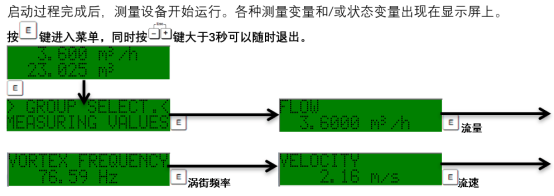
- Measured values: By default, displays main variables such as flow rate and total, with configurable units and range.
- Status prompts: If a fault or warning occurs, the corresponding error code and brief description will be displayed.
During startup, if self-test fails, the display will lock the error message, and troubleshooting must be carried out according to the manual. After normal startup, the display interface can switch between different variables via keys.
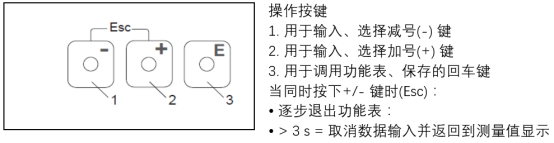
2. Key Functions and Operations
Prowirl 72 is usually equipped with three keys (or magnetic keys) for on-site operation. The key functions are defined as follows:
| Key | Symbol | Function |
|---|---|---|
| Plus/Minus key | + / - | Scroll through menus or modify parameter values |
| Enter key | E | Enter menu, confirm selection, or save settings |
| Escape key | ESC | Return to previous menu or cancel current operation |
Different modes can be entered by key combinations. For example, pressing both "+" and "-" keys simultaneously can quickly return to the main display interface. For specific operations, please refer to the actual instrument.
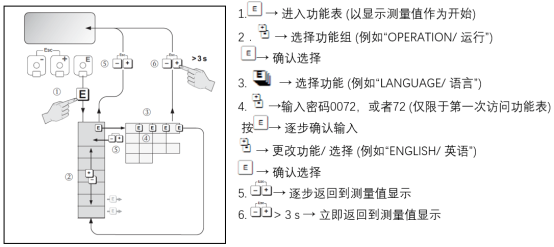
3. Typical Operation Steps
The following uses changing the range as an example to illustrate the basic operation process:
- In measurement mode, press the E key to enter the main menu.
- Use the + or - key to select the "Setup" menu, and press E to confirm.
- Select the "Range" option and press E to enter.
- Use the + or - key to modify the value, and press E to save.
- Press the ESC key to exit step by step and return to measurement mode.
During operation, the display will prompt the current step, ensuring execution according to the prompts. If there is no operation for a long time, the instrument may automatically return to measurement mode.
4. Precautions
- Before operation, ensure that the safety manual has been read to avoid misoperation affecting measurement.
- After modifying parameters, it is recommended to record the changes for traceability.
- If an error code is displayed, troubleshoot the fault first before continuing operation.
- When operating with magnetic keys, use a dedicated magnetic pen to avoid scratching the panel.
Mastering the startup display and key operations of Prowirl 72 can effectively improve on-site commissioning efficiency. For more detailed menu instructions, please refer to the complete technical manual.