
Prowirl 72 Current Output Gas Range Setting Overview
Prowirl 72 is a vortex flowmeter launched by Endress+Hauser, widely used for flow measurement of gases, steam, and liquids. Its current output (4-20 mA) can be configured to correspond to different gas ranges to meet the needs of on-site control systems or recorders.
Correctly setting the current output gas range is a key step to ensure accurate signal transmission and avoid measurement errors caused by range mismatch. This article is intended for engineering technicians and procurement personnel and provides clear operating instructions.
Preparation Before Setting
Required Tools and Materials
- Prowirl 72 operating manual
- HART handheld communicator or commissioning software such as FieldCare
- On-site gas process parameters (maximum flow, minimum flow, pressure, temperature)
- Multimeter (for verifying current output)
Safety Precautions
- Ensure the flowmeter is powered on and in measurement mode.
- If operating in a hazardous area, observe the relevant explosion-proof regulations.
- Before modifying the range, it is recommended to record the original parameters for restoration.
Current Output Gas Range Setting Steps
The following steps use a HART handheld communicator as an example; other commissioning tools follow similar paths.
-
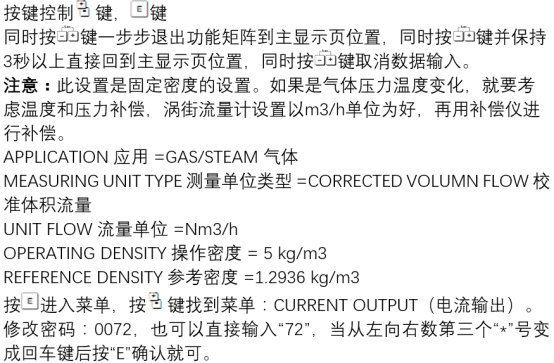
Enter the main menu: Connect the handheld communicator and enter "Device Setup" or "Online Configuration".
-
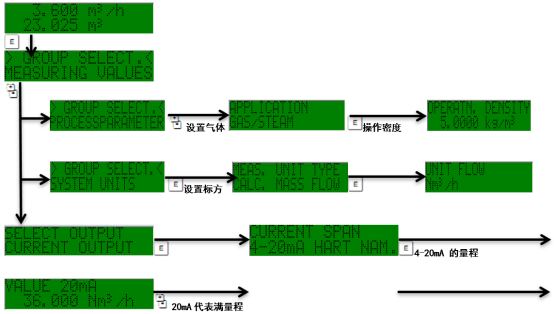
Select the current output channel: In the configuration menu, find "Current Output" or "Analog Output", and select the corresponding output channel (usually channel 1).
-
Set the lower range value (4 mA): Enter the gas flow value corresponding to 4 mA, usually 0 or the minimum flow. Confirm the unit (such as Nm³/h, kg/h).
-
Set the upper range value (20 mA): Enter the gas flow value corresponding to 20 mA, that is, the maximum flow. Ensure that this value does not exceed the upper limit of the sensor range.
-
Save and exit: After confirming that the parameters are correct, save the settings and return to the measurement interface.
Example of Range Setting Parameters
The following table lists examples of common gas range configurations for reference:
| Parameter | Example Value | Description |
|---|---|---|
| Flow corresponding to 4 mA | 0 Nm³/h | Lower range value |
| Flow corresponding to 20 mA | 1000 Nm³/h | Upper range value |
| Flow unit | Nm³/h | Select according to process conditions |
| Damping time | 1 s | Optional, suppresses fluctuations |
Verification and Common Problems
Verify the Current Output
- Use a multimeter in series to measure the current and confirm that 4 mA and 20 mA correspond to the correct flow.
- If the output deviation is large, check whether the range setting matches the sensor range.
Common Problems
- The output is always 4 mA: The flow may be below the lower limit, or the range setting may be incorrect.
- The output exceeds 20 mA: The flow exceeds the upper range value, and the upper limit needs to be reset.
- The range cannot be modified: Check whether it is in write-protected status, or whether a password is required.
Summary
Correctly setting the current output gas range of the Prowirl 72 is the basis for ensuring accurate transmission of flow signals. By following the above steps and adjusting parameters according to actual process conditions, the reliability of the measurement system can be effectively improved.
For more detailed parameter descriptions, please refer to the official operating manual or contact technical support.