
Overview of Prowirl 72 Current Output Liquid Range Setting
Prowirl 72 is a vortex flowmeter launched by Endress+Hauser, widely used in liquid flow measurement. The range setting of its current output (4-20mA) directly affects the accuracy of signal transmission and system compatibility. Based on the official operating guide, this article analyzes the setting process of the liquid range step by step.
Preparation Before Setting
Tools and Safety Confirmation
- Ensure that the flowmeter is powered on and in measurement mode.
- Prepare debugging tools such as a HART handheld communicator or Endress+Hauser FieldCare.
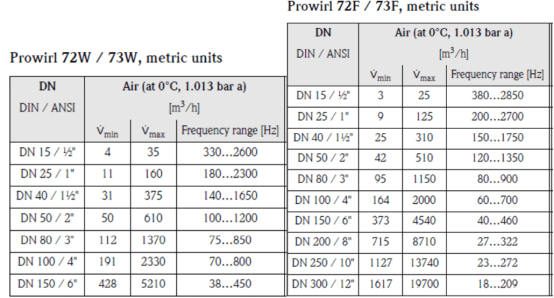
- Confirm the maximum flow rate and minimum flow rate values of the current liquid working condition.
Parameter Recording
Record the current range upper and lower limits, damping time, and other parameters for restoration or comparison. It is recommended to back up the original configuration before making changes.
Steps for Setting the Current Output Liquid Range
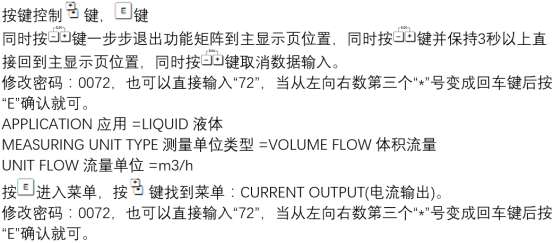
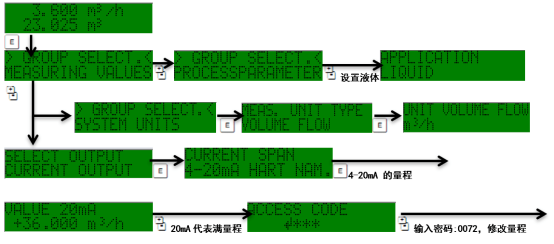
Step 1: Enter the Parameter Setting Menu
- Enter the main menu through the local display or debugging tool.
- Select "Setup" → "Current Output" → "Range Setting".
Step 2: Configure the Range Upper and Lower Limits
- Enter the flow value corresponding to 4mA (usually 0 or the minimum flow rate).
- Enter the flow value corresponding to 20mA (usually the maximum flow rate).
- Confirm that the unit is consistent with the engineering unit (such as m³/h, L/min).
Step 3: Save and Activate
- Save the settings and return to measurement mode.
- Observe whether the current output changes linearly with the flow rate.
Reference Table of Range Setting Parameters
| Parameter Item | Description | Typical Value |
|---|---|---|
| Flow corresponding to 4mA | Current output lower limit | 0 m³/h |
| Flow corresponding to 20mA | Current output upper limit | Set according to working condition |
| Damping time | Output response smoothness | 1-5 seconds |
| Fault mode | Output current during alarm | 22mA or 3.6mA |
Verification and Common Problems
Verification Methods
- Use a multimeter to measure the current output and compare it with the flow display value.
- Check the linearity to ensure there is no jump or saturation.
Common Problems
- Output is always 4mA: Check whether the flow rate is below the lower limit or there is a sensor failure.
- Output is always 20mA: The flow rate exceeds the upper limit or the range setting is incorrect.
- Output fluctuates greatly: Adjust the damping time or check fluid stability.
Summary
Correctly setting the current output liquid range of the Prowirl 72 is the key to ensuring accurate transmission of flow signals. Following the above steps and adjusting according to working condition parameters can effectively improve the reliability of the measurement system. For further assistance, please refer to the official manual or contact technical support.