
8E3B Field Display Unit Operation Guide
In the previous section, we introduced the measurement principle and wiring method of the 8E3B. This section will focus on how to operate the 8E3B through the field display unit, including menu navigation, parameter settings, and permission management.
Menu Navigation and Basic Settings
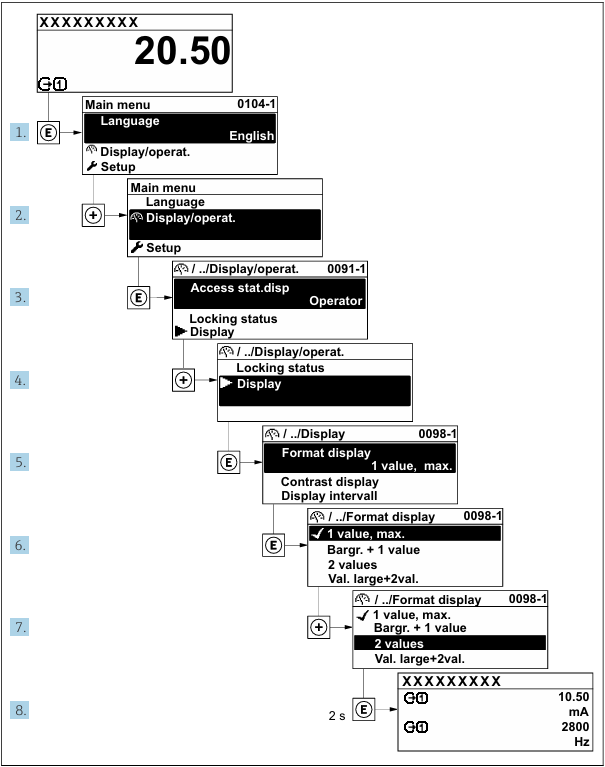
After entering the main menu, basic settings can be performed by following these steps:
- Language setting: Select the corresponding operating language as needed.
- Display/Operation: After entering, there are multiple sub-options for step-by-step demonstration and configuration.
- Access status display: The default display is "Operator". After entering the password, expert mode can be accessed.
- Display settings: The display format, contrast, and display interval can be changed.
- Contrast adjustment: Modify the display contrast through subsequent steps. The figure shows the contrast as one value, followed by the maximum value.
- View current and frequency: The final step allows viewing real-time current and frequency values.
Each parameter corresponds to a unique menu number and can be accessed directly through the field display unit. Users only need to enter the access password in the password input field to directly view the relevant parameters.
Parameter Editing and Help Text
Some parameters are equipped with help text, which users can view through the menu view. The help text briefly explains the parameter function, helping to achieve fast and safe commissioning operations.
Parameter modification can be completed through the following two editors:
- Numeric editor: Used to modify parameter values (such as specification-type parameters like limit values).
- Text editor: Used to input parameter-related text (such as identification-type information like tag names).
When the input value exceeds the allowed range, the system will automatically display a prompt message.
User Permissions and Password Protection
After the user sets an access password, the two user roles "Operator" and "Maintenance" will have different parameter write permissions, thereby protecting device settings and preventing unauthorized modifications through the field display unit.
The device is shipped without an access password by default. In this case, access permissions (including read and write) are unrestricted, corresponding to the "Maintenance" user role by default.
In the field display unit, if a lock icon is displayed before a parameter name, it indicates that the parameter has been locked and protected by the user password and its value cannot be modified through the field display unit.
After the keypad is locked, the entire operation menu cannot be accessed through field operations. Users can neither continue to view the operation menu nor modify specific parameters, and can only view measured values on the operation display interface. The keypad lock can be enabled and disabled through text menu operations.
Summary
The above is the basic usage introduction of the 8E3B field display unit. Proper use of menu navigation, parameter editing, and password permission functions can effectively improve device commissioning efficiency and operational safety.